1034
submitted 1 month ago* (last edited 1 month ago) by Canaii@lemmy.zip to c/opensource@lemmy.ml

We’re proud to present the first release of GIMP 3.2!

This marks a year of design, development, and testing from volunteers and our community.

Here are some of the many highlights to look out for:

Link Layers

You can now use Link Layers to incorporate external image as part of your compositions, easily scaling, rotating, and transforming them without losing quality or sharpness. It functions similar to the “Smart Object” concept from Photoshop. The Link Layer will automatically update if the external image is changed in another editor – for example, if you include a SVG logo as a Link Layer in GIMP, you can edit it in Inkscape and see the changes live in GIMP as well!

You can create a new Link Layer by choosing Open as Link Layer... in the File menu. You can change the image used at any time in the Layer Attributes dialog, which you can access by double-clicking the layer in the dock or by choosing Edit Layer Attributes... from the layer menu.

Vector Layers

The Path tool can now create Vector Layers, which lets you draw shapes with adjustable fill and stroke settings. The shape of the vector layer also automatically updates whenever you adjust the path, and you can non-destructively rotate, scale, and transform it too

PaintBrush improvements

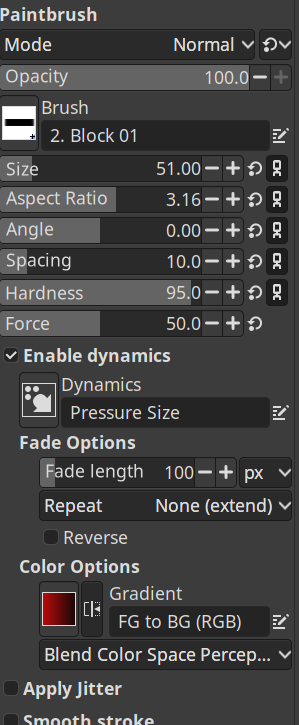
The MyPaint Brush tool has been upgraded, adding 20 new brushes, including a much-requested arrow brush. It now automatically adjusts to your canvas zoom and rotation for more dynamic painting.

Better Text Editor

Our Text Editor has been the focus of several development projects to improve its usability and functionality. You can now drag the on-canvas text editor to move it out of the way when writing text. Several common shortcuts are now supported (such as Ctrl + B for bold, Ctrl + I for italics, and Shift + Ctrl + V for pasting unformatted text).

Non-Destructive Filter Updates

As well as working on new non-destructive layers (vector layers, link layers, and text layers), we’ve also been working on the non-destructive filters! You can now apply filters to channels non-destructively, in addition to layers and layer groups.

Overwrite Mode

A new Overwrite paint mode allows you to draw over existing colors without blending their transparency. It has many useful applications when working with pixel art

UX/UI improvements

This release includes a TON of small user interface and user experience improvements

New System color scheme

There is a new system color scheme for default themes. If set, it will automatically update GIMP’s theme colors to match the current OS settings.

Automatic transparency

The Crop Tool and NDE filters now automatically add transparency to a layer when necessary, rather than requiring you to remember to do it manually.

Switch between tools easily

You can now quickly switch back and forth between your 2 most recent tools with the Shift + X shortcut

Welcome Dialog improvements

The Welcome Dialog has received improvements to help streamline user workflows.

It now recognizes the Ctrl + 0, 1, 2… 9 shortcuts for opening the most recent images.

It now recognizes your shortcuts to create a new image, or open an existing one (whether the respective default Ctrl + N or Ctrl + O, or your custom shortcuts)

The Welcom Dialog no longer appears if you intentionally open GIMP with an image

Flip images with your keyboard

The Flip and Shear Tools now respond to the arrow keys, similar to the Move and Rotate Tools.

Flip Tool: You can use the Left and Right arrows to flip the image horizontally, and the Up and Down arrows to flip it vertically.

Shear Tool: You can use the Left and Right arrows to shear your image horizontally, and the Up and Down arrows to do the same vertically. Like the Move tool, you can hold down Shift to shear with a larger value.

For Script and Plug-in Developers

GIMP 3.0 brought non-destructive filters and a new GimpDrawableFilter API for script developers to create them. However, it wasn't easy to find the names and properties for the extensive list of potential filters, especially for third-party GEGL filters. A new GEGL Filter browser has been added to make it easier to find non-destructive filters to use.

New formats

GIMP 3.2 includes built-in support for even more file formats! These range from well-known formats like APNGs to obsolete archival formats such as Seattle FilmWorks photos, supporting your quest of old data retrieval. For retro game developers, we now support Sony PlayStation TIM and Sega Dreamcast PVR textures.

We also added export support for JPEG 2000 images, which is the standard for the digital cinema industry. This now matches our import support, which we’ve had since GIMP 2.8

In addition to our existing darktable and RawTherapee plug-ins, we’ve added support for using ART for editing Camera RAW images.

As a side effect of adding support for NASA‘s .hgt.zip image format, GIMP can now load compressed images from any format that we currently support.

Total Ink Coverage value

You can now see the Total Ink Coverage value for a color in the CMYK Color Selector. This is useful to know when soft-proofing your image for printing, as your printer may have an ink coverage limit to prevent over-saturation of the page.

https://www.gimp.org/release-notes/gimp-3.2.html#usability-improvements

This release is a true GAME CHANGER!! Nothing will ever be the same. Adobe just got punched right in the face.

You can support Gimp

Thank you SO MUCH to developers, designers, translators, testers, donors and all members of our community 👏🏼👏🏼
top 50 comments
sorted by: hot top controversial new old
[-] HexaBack@lemmy.blahaj.zone 315 points 1 month ago

I wouldn't call this a "face-punch" to adobe, but GIMP is one of those softwares that just keeps getting better with every update no matter what

they finally fixed their awful text editor!

[-] pennomi@lemmy.world 125 points 1 month ago

If they really want to punch Adobe in the face they need to give GIMP’s UI the Blender treatment.

[-] ChristerMLB@piefed.social 106 points 1 month ago

at minimum it would be nice if they just looked at the spacing and organization of the different palettes. This does not look tidy... or professional, really. It looks cramped and messy.

[-] errer@lemmy.world 75 points 1 month ago

Half the elements are sharp, half are blurry. Icons look different sizes. Random amounts of spacing between elements. This is the UI of a piece of graphic editing software too…cmon guys.

[-] PrinzKasper@feddit.org 19 points 1 month ago

From my experience Gimp also has issues when one of the screens connected to the pc has fractional scaling. It just makes the UI look like shit on all screens for some reason.

[-] jpicture@lemmy.zip 23 points 1 month ago

I made a theme which is more professional-looking and less busy/cramped if you're interested:

https://jpicture.net/printroomexpertsuperflat/

I'm about to release a dark version of it too.

load more comments (16 replies)
load more comments (13 replies)
[-] ace_garp@lemmy.world 45 points 1 month ago

If you need a different GIMP UI, PhotoGIMP is a patch that may make it more useable for you.

https://github.com/Diolinux/PhotoGIMP

[-] UnfinishedProjects@piefed.zip 18 points 1 month ago

Wow, never knew this existed. I usually don't use gimp all that much compared to inkscape - so I'm not sure if it's worth the trouble...but this is very nice. I honestly don't know what they wouldn't pull these settings into the default gimp, even if only as an alternative skin option you can select.

The major drawback of gimp for many people is the interface, I think. That's why blender has really taken off since it's UI/UX update.

[-] pennomi@lemmy.world 15 points 1 month ago

It wasn’t until a couple years ago that GIMP finally made single window mode the default. They are irrationally against fixing their UI.

[-] mech@feddit.org 17 points 1 month ago* (last edited 1 month ago)

No they are just severely limited by dev time (and even more by a lack of UI designers). They have less than a thousandth of Adobe's resources. Why don't you help improve it?

load more comments (7 replies)
[-] bonenode@piefed.social 15 points 1 month ago

There's two screenshots. One is just promotional art.

The other one doesn't look much different to me than the single window mode Gimp introduced some time back.

Why aren't there any side by side screenshots pointing out what is different?

I think it is great that people made the effort for this, but like almost all github projects they really lack a good showcase of what they have.

load more comments (1 replies)
load more comments (2 replies)
load more comments (16 replies)
[-] morto@piefed.social 34 points 1 month ago

A bite in the ankle, but still damaging. Go GIMP!

[-] pineapple@lemmy.ml 16 points 1 month ago

Just keeps getting better with every update no matter what

It's crazy how we have reached a point were a piece of software is good when it doesn't get worse with each update.

load more comments (14 replies)
[-] gergolippai@lemmy.world 90 points 1 month ago

cue users of adobe products since 1950 complaining about how gimp ui is not intuitive after trying it for a full 5 minutes :)

[-] thingsiplay@lemmy.ml 47 points 1 month ago

I find Photoshop not intuitive too, because its different from GIMP.

[-] FG_3479@lemmy.world 21 points 1 month ago

You can add PhotoGIMP to change the layout to be similar to Photoshop.

load more comments (2 replies)
load more comments (4 replies)
[-] raspberriesareyummy@lemmy.world 62 points 1 month ago

I have no idea what almost any of that means but I assume professional graphics designers will. And go gimp! I still struggle with understanding how to do things whenever I need to do something new but I absolutely and exclusively use gimp for image editing. I am forever grateful for such a great tool.

PS: please don't accept slop contributions ever

[-] thedirtyknapkin@lemmy.world 17 points 1 month ago* (last edited 1 month ago)

as a media professional i can tell you that the non destructive editing features are huge. that used to be the first thing I'd point out as a specific reason i didn't use gimp.

the ui/ux is still the biggest problem, but honestly THIS was a big part of the issue. how tedious is was to make itterarive adjustments.

may the kindly lords of foss save you if you did work for a client and they wanted you to change something minor. if you did it all destructivly in gimp, you basically just had to start over. now you can organize by linked layers and vector layers to create layer masks and adjustment layers. it's most useful for photo manipulations and composites, but I'm sure most advanced users will find it solves something for them regardless of what they make.

this isn't enough to get me to switch, but it's a great step in a good direction. I'll always be supportive of that.

load more comments (1 replies)
[-] webdoodle@lemmy.ml 62 points 1 month ago

I used Photoshop for over a decade, took several classes, spending thousands of hours using it. I quit using it when they wanted me too pay for it as a service. Recently I tried GIMP, and though it took me a while to find some things, I'm now doing everything I could do previously with Photoshop, ironically except link layers. That was the last thing I needed to fully endorse GIMP, and it seems to be exactly what I needed. Fantastic work!!

load more comments (5 replies)
[-] warmaster@lemmy.world 31 points 1 month ago

They can add all the features they want, but it won't be usable until they fix their damn UX/UI.

After working for ~30 years with adobe software, when I switched to Linux I learned inkscape in no time. Same happened with Affinity Studio. Both are great, intuitive.

Gimp's is just a hot mess

[-] mr_satan@lemmy.zip 32 points 1 month ago

Disclaimer:
I've never used Adobe's photoshop.

What's wrong with GIMP UI/UX? I've used it for small stuff and it did the job. It was… fine? No complains.

So a genuine question: what's wrong with it for someone who uses these programs more in depth?

[-] moopet@sh.itjust.works 14 points 1 month ago

I used PS for a few years then switched to GIMP. Initially I thought it was confusing (to be expected) but a friendly colleague showed me the basics and now I prefer it. Learning took hardly any time really.

load more comments (2 replies)
load more comments (3 replies)
load more comments (2 replies)
[-] rmuk@feddit.uk 31 points 1 month ago

I just 100% all-the-time will always want someone to release a fork of GIMP that is totally identical in every way but has a different name. I can't tell you the amount of time it was rejected by schools because of it.

[-] cmhe@lemmy.world 14 points 1 month ago

That was already tried, not very sucessfully. It was called glimpse.

load more comments (1 replies)
load more comments (10 replies)
[-] Ludrol@szmer.info 29 points 1 month ago
[-] Crozekiel@lemmy.zip 28 points 1 month ago

This release is a true GAME CHANGER!! Nothing will ever be the same. Adobe just got punched right in the face.

This is an absolutely ridiculous statement...

[-] alexquiniou@lemmy.zip 26 points 1 month ago

Its getting better. Doesn't mean it's the best yet.

Keep the good work. And listen to feedback.

load more comments (5 replies)
[-] Krauerking@lemy.lol 24 points 1 month ago

I am excited about new GIMP and somehow still exhausted with current GIMP

[-] Damaskox@lemmy.world 18 points 1 month ago

"Better text editor" makes me chuckle how I took a picture I edited in GIMP to Paint always when I wanted to add some text on it 😂
Was somehow much less painful on Paint to do it

load more comments (2 replies)
[-] AstroLightz@lemmy.world 16 points 1 month ago
[-] thingsiplay@lemmy.ml 34 points 1 month ago

The long awaited shape tool is coming up next. So the next GIMP version is shaping up to be a great release. This reply is in no shape or form a word play. :>

[-] LillyPip@lemmy.ca 16 points 1 month ago

Sigh, okay, I’ll try it again.

Like I do every time there’s a huge update. Will this time be different? I hate Adobe, but the Gimp has yet to live up to its promise to replace it. I’d love to never give Adobe another cent, but we’ll see.

load more comments (1 replies)
[-] FooBarrington@lemmy.world 15 points 1 month ago

Damn, that sounds great! Hard to believe we're already at 3.2, it felt like I was waiting for 3.0 for a decade!

[-] three@lemmy.zip 13 points 1 month ago

OP.... It's a software release. Stop with this unnecessary tribalism bullshit

[-] wheezy@lemmy.ml 47 points 1 month ago

I'm not for "tribalism" if it's related to a specific piece of software vs. another. But I definitely am on the side of open source vs. a garbage subscription based model of closed source software.

[-] Hadriscus@jlai.lu 34 points 1 month ago

I find the vibe unnecessary as well, but I think it's more than tribalism, the stake here is freeing generic image editing from the capital

[-] sqauffle@slrpnk.net 23 points 1 month ago

Do you tell people at the bar to calm the fuck down when the hockey game is on?

load more comments (7 replies)
load more comments
view more: next ›
this post was submitted on 14 Mar 2026
1034 points (98.0% liked)

Open Source

46513 readers
59 users here now

All about open source! Feel free to ask questions, and share news, and interesting stuff!

Useful Links

Rules

Related Communities

Community icon from opensource.org, but we are not affiliated with them.

founded 6 years ago
MODERATORS