1

Just made LiftTrace public after months of development. It's a self-hosted weightlifting / training log that runs in a single Docker container on your own hardware, with a PWA frontend and a signed Android APK. Sister app to NutriTrace under the same TraceApps umbrella.
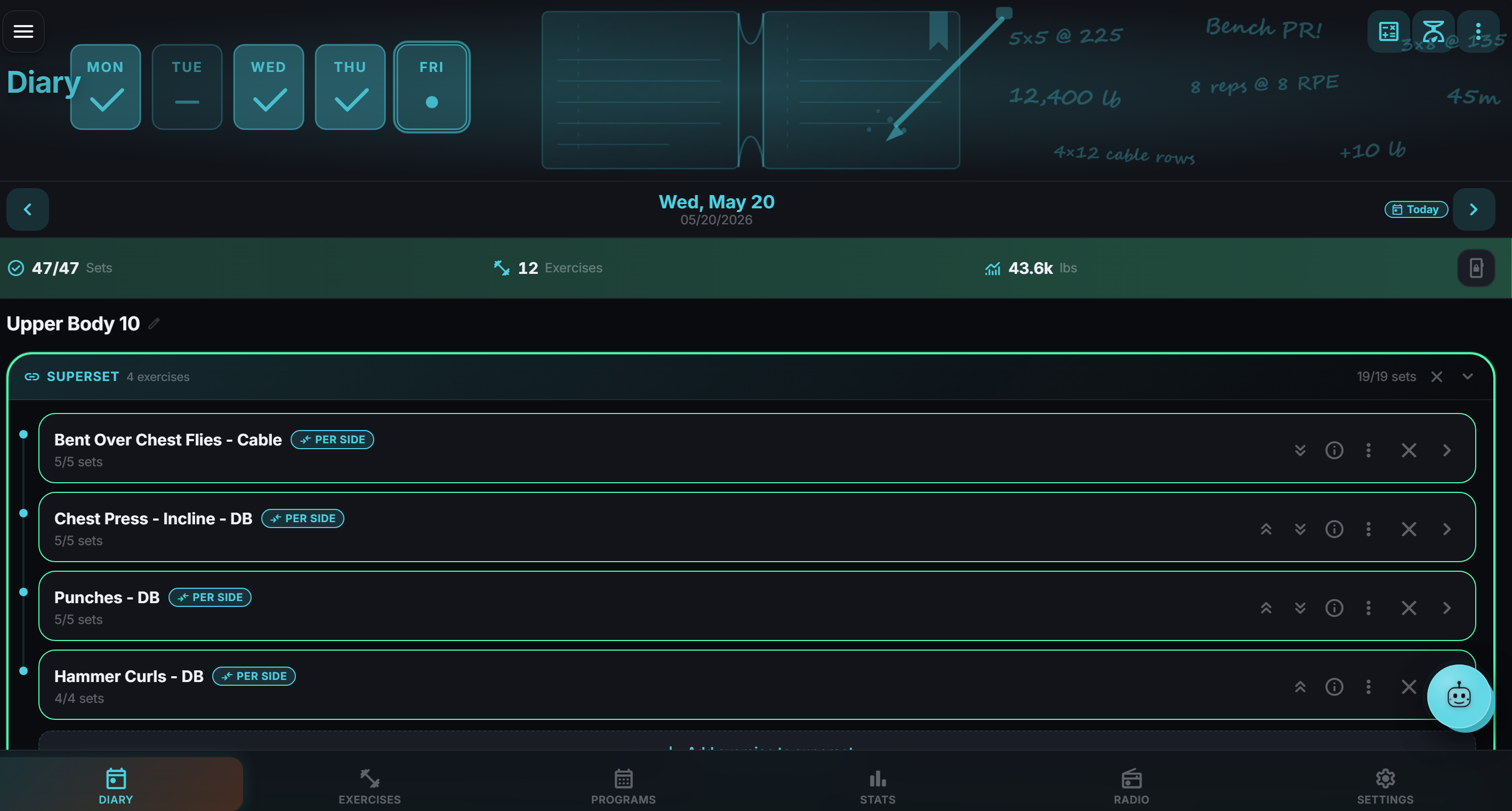
LiftTrace Diary

What it does:

  • Diary with sets, reps, RPE, warm-up flagging, supersets, rest timer
  • Smart Add — type or speak your workout ("bench 3x5 @ 225, A1: curls 3x12, A2: pushdowns 3x12") and the AI parses it into structured sets
  • Programs with mesocycles, weekly templates, coach prescriptions for trainer / athlete pairs
  • Exercise library seeded from wger + Free Exercise DB (~1,500 exercises with images), plus your own custom uploads
  • Statistics: volume, PRs, frequency heatmap, body weight trends
  • OIDC SSO for Authentik, Keycloak, Pocket ID, Authelia, Auth0, Google, etc.
  • Workout History Import from Strong, Hevy, FitNotes, and Jefit CSVs (so you don't lose your history switching over)
  • Radio player built in for Subsonic / Jellyfin / Plex / Emby plus internet stations (because lifting and lockscreen media controls > switching apps mid-set)
  • AI coach with live workout context — bring your own Claude / OpenAI / Gemini key, or point it at Ollama / LM Studio / any OpenAI-compatible endpoint
  • Android app with offline-first SQLite, biometric sign-in, native ExoPlayer, optional WorkManager reminders

Self-hosted principles:

  • AGPL-3.0, source is open, no telemetry, no central server, no analytics, no cloud sync to anybody else
  • Single Docker container + bind-mounted volumes for DB and uploads
  • Your data stays on your hardware. Back up with cp, restore with cp.

Quick start:

services:
  lifttrace:
    image: ghcr.io/traceapps/lifttrace:latest
    ports: ["3002:3003"]
    volumes:
      - ./data/db:/data/db
      - ./data/uploads:/data/uploads
    environment:
      - DB_PATH=/data/db/lifttrace.db
      - UPLOADS_PATH=/data/uploads
      - JWT_SECRET=change-me
1
submitted 6 days ago* (last edited 5 days ago) by TraceApps@lemmy.world to c/selfhosted@lemmy.world

Features

  • Bulk Food Import via paste JSON or upload CSV (Settings → Import & Export)
  • Live nutrition preview on the Add to Diary sheet (macros update with portion / unit / servings)
  • Mass-aware unit conversion when scaling nutrition (g ↔ oz ↔ lb, ml ↔ cup, tsp ↔ tbsp)
  • Custom Units in Settings ("shot", "scoop", "stick", etc.)
  • Scan Label: snap a photo of a nutrition label and the AI Assistant fills in the values
  • Smart Share / View on OFF: existing Open Food Facts products link straight to their wiki page for editing; new ones get a Share button to contribute back
  • Connection status banners across every integration with one-tap Test / Sync / Disconnect
  • Settings auto-save by default; no Save button to remember
  • Day rollover at midnight when the app stays open overnight
  • Barcode scanner now fully on-device on Android, no Google Play Services required (works on GrapheneOS / CalyxOS / e/OS)
  • Custom nutriment order from Settings is reflected everywhere (food editor, meal editor, diary nutrition bar)
  • Vitamin D, Calcium, Iron, and Potassium visible by default on new installs (FDA Nutrition Facts label mandatory fields)
  • Svelte 5 + Vite 6 + Express 5 + bcryptjs 3 framework upgrade (main bundle ~22% smaller)

Fixes

  • Disabling user management no longer triggers the setup wizard on every reload (#34)
  • Data APIs in single-user mode no longer return 503 "Setup required" on every call (#34 part 2)
  • Single-user mode: only the first food item added each day was visible in the UI. SQLite quirk on null user_id. Includes a one-time migration that recovers items already in the database (#37)
  • Food saves on Android no longer duplicate the previous food (#32)
  • "Most Used" / "Recently Used" food sort on Android now reflects real usage
  • MyFitnessPal Reports → Export CSV imports cleanly now (aggregate-per-meal shape)
  • Wellness scores refresh if today's sleep finishes syncing after the morning snapshot
  • Import Nutrition History action row no longer overlaps the duplicate-date radios (#33)
  • Barcode scanner no longer gets stuck re-opening the camera after a scan
  • Barcodes that don't match anything in OFF now drop you in the food editor with the code prefilled instead of a dead-end toast, so you can contribute the product back
  • Open Food Facts contribution now sends correct per-serving values and uploads your product image (both were silently broken)
  • AI Assistant respects AI_ENABLED=true and the full AI_* env-var set; toggle, settings card, and chat all honour the proxy (#36)
  • kcal / kJ values are consistent everywhere now: food editor, diary footer, meal totals, statistics, goals, weekly summary email, push notifications (#38)
  • AI Assistant Gemini models updated to 2.5 Flash + Lite (Google retired 2.0 Flash and 1.5 Flash)
  • nodemailer updated to 8.0.7 (patches an SMTP command-injection advisory)
  • Several smaller things, see the full changelog

Signed APK + docker image on the release page.

Self-hosted, AGPL-3.0, no telemetry, no account needed. docker compose up and go.

[-] TraceApps@lemmy.world 0 points 1 week ago

Yes! Settings → Backup → Nutrition Import. Built-in adapters for MyFitnessPal, Cronometer, LoseIt, and a generic CSV shape. Export your diary from MFP (it's a CSV in their account settings), upload it, preview, commit. Skip / Merge / Replace per-date semantics, so you can re-import safely without overwriting.

[-] TraceApps@lemmy.world 1 points 1 week ago

Open Food Facts (OFF) for barcodes. Free, open license, community-edited. Their API: https://world.openfoodfacts.org/api/v2/product/.json

8

Self-hosted nutrition + wellness tracker. Latest release rolls up two weeks of work.

New features (rc.21 → rc.26):

  • Recipe yields — declare "this makes N servings" and per-serving math flows through the diary
  • Intermittent fasting tracker — custom presets, history, recurring schedule that auto-starts at a chosen time on chosen days
  • Adaptive TDEE — learns your true daily expenditure from a rolling 35-day window of weight + diary instead of a static estimate
  • Android biometric sign-in — fingerprint / face unlock in server-connected mode
  • Per-serving Open Food Facts import — when a barcode-scanned product has serving data, prefill nutrition per-serving instead of per-100g
  • Health Connect → web — Android-synced Health Connect data now reaches the server and renders on the web Wellness page
  • Sharing rework — per-category sharing form, source filter on Meals/Recipes, zxcvbn-backed password-strength policy

Bug fixes: cross-pollinated food images on diary entries, duplicate foods on rapid barcode scans, scheduler crash, Mealie Test button.

Repo: https://github.com/TraceApps/nutritrace Release: https://github.com/TraceApps/nutritrace/releases/tag/v1.0.0-rc.26

Single docker compose, SQLite, signed APK on the release page.

[-] TraceApps@lemmy.world 1 points 2 weeks ago

Not directly. NutriTrace doesn't record steps or GPS itself; it reads them from whatever's already tracking you (Health Connect on Android, or Fitbit/Garmin/Withings via their cloud APIs). So if Google Fit, Samsung Health, or your watch is counting your steps and logging workouts, NutriTrace will pull those numbers in and chart them alongside your nutrition.

2

NutriTrace is a self-hosted nutrition tracker (Docker on the server, PWA in the browser, native Android app). AGPL-3.0, no telemetry, no accounts on external services, your data stays on your hardware.

This release is the biggest one since the Android app shipped: the Wellness layer moves off the legacy Fitbit Web API (which Google is sunsetting in September 2026) onto the new Google Health API, the numeric Stress Score becomes Resilience (Optimal / Balanced / Low), Fitbit's new Sleep Quality sub-metrics show up under Sleep, and the Diary gets a Cronometer-style Split Recipe action.

What's new

Google Health migration — Wellness data now flows through Google Health instead of the deprecated Fitbit Web API. Existing Fitbit data still comes from the same device; only the connection method changes. Fitbit users will see a "Re-link required" notice in Settings → Wellness with the migration steps. Old tokens keep working through a transition window.

Resilience replaces the numeric Stress Score — Fitbit retired the 0-to-100 score and renamed it Resilience with three buckets (Optimal / Balanced / Low). The Wellness page reflects the change with a category badge, a one-line interpretation, and a breakdown of the three pillars Fitbit uses (Physical Calmness, Activity Balance, Sleep Patterns). Historical Stress values stay in the database for reference.

Sleep Quality sub-metrics — Time to Sound Sleep, Sound Sleep, Restlessness, and Interruptions appear under the Sleep tab when data is available. Restlessness under-counts vs Fitbit because Google Health doesn't expose the raw motion data Fitbit's app uses internally; the others track within a few minutes on most nights.

Split Recipe on the Diary — Long-press a saved recipe in your diary and tap Split Recipe to break it into its component ingredients in place. The recipe stays as the parent (so totals are preserved); a chevron expands to reveal each ingredient scaled by however much of the recipe was logged. Each child is editable (adjust portion, remove one) without touching the saved recipe in your library.

Info button on saved meals and recipes in the Foods picker — tap the i on any meal or recipe row to see the full ingredient list with portions and per-item energy before logging it. Mirrors the existing yesterday-meals expand pattern

Issues, feature requests, and integration test reports are all welcome on GitHub.

[-] TraceApps@lemmy.world 0 points 3 weeks ago

Just pushed rc.15 with the fix. Energy unit setting is now respected across the app, and the wizard auto-picks kJ for AU and NZ on first run.

[-] TraceApps@lemmy.world 0 points 3 weeks ago

Glad you're enjoying it.

On the kJ, you're right. The setting was being respected for goals and storage but a bunch of display spots still had kcal hardcoded. Just pushed the fix to dev and it'll be in the next public release. Also added auto-detect so if your device locale is en-AU or en-NZ the wizard pre-selects kJ on first run, no toggle needed (but present now in settings).

On AI for coding, yes I utilize it. Claude Code to be specific. It makes me more efficient and helps lift the work I ship.

Will let you know when i push out the update, should be later today.

1

Quick update for anyone following the project. NutriTrace is a self-hosted nutrition tracker I've been building. Single Docker container, your data stays on your hardware, no external accounts.

This release ships the first native Android app alongside the existing PWA. Signed APK is attached to the GitHub release.

What you get on Android:

  • Standalone, or connect it to a NutriTrace server for sync
  • Health Connect for steps, sleep, heart rate, body weight
  • Native barcode scanning
  • Native notifications for water reminders, meal prompts, weigh-ins, and goal celebrations
  • OIDC SSO via deep link if you run Authentik, Keycloak, Pocket ID, etc.

Release: https://github.com/TraceApps/nutritrace/releases/tag/v1.0.0-rc.14 Repo: https://github.com/TraceApps/nutritrace

Still on the v1.0 release-candidate cadence so there will be be bugs. Please feel free to post issues here or on Github.

Thanks to everyone who's tried it, provided suggestions and filed bugs along the way. If you find it useful, a star on the repo or a mention to someone looking for a self-hosted nutrition/fitness alternative helps a lot.

[-] TraceApps@lemmy.world 1 points 3 weeks ago

Thanks for implementing it that fast! Unfortunately I wasn’t able to test it.

I found the new section in the readme. So I followed it. I created an admin account (which confused me a bit - my user already had admin permissions. So why is it necessary to create another admin user?). Then I wanted to logout and login with the admin again. But I wasn’t able to figure out how to log out. So I just deleted the cookies and local storage.

After that I was greeted by the login page. So I logged in as admin, entered the User Management - and found an interface to manage users. Ok, sounds logic to find a user management tool in the “user management” menu entry. But the readme said, that there should be oidc settings. Maybe they got lost in a merge conflict or something like that. I was testing on rc12.

Anyways I would prefer an env variable to configure oidc. I like to separate the technical configuration (like credentials, etc) from the user space configuration.

This comment may sound super negative, but I’m actually very grateful you addressed this feature. Thanks!

Thanks for the detailed walkthrough. A few of the rough edges you ran into are fixed in the latest release:

The admin-account confusion makes sense in hindsight. If you were already running NutriTrace single-user, you genuinely didn't need an admin account, that step exists because OIDC requires user management to be on. The README now spells that out as a prerequisite up front so it doesn't feel like surprise paperwork.

Logout has a real home now. Profile lives at the very top of Settings as a card showing your name and photo, and Log Out is right there inside it. No more digging through the cookie jar.

The "where are the OIDC settings" question was on me. They were buried inside User Management. They're now their own top-level section called Authentication, sitting right under User Management, with presets for Authentik, Keycloak, Authelia, Pocket ID, Auth0, Google, and a generic OIDC option for anything else.

And on your env-var preference, that's in too. You can configure providers entirely from .env or docker-compose.yml. Single-provider shorthand:

OIDC_ISSUER=https://auth.example.com/ OIDC_CLIENT_ID=nutritrace OIDC_CLIENT_SECRET=... OIDC_DISPLAY_NAME=Authentik OIDC_REDIRECT_URIS=https://nutritrace.example.com/api/auth/oidc/callback/1

Multi-provider works with OIDC_PROVIDER_2_, OIDC_PROVIDER_3_, etc. Anything you define this way shows up in the Settings UI with a lock badge and is read-only there, so it's clear where the source of truth lives. Full doc in .env.example and the README.

Pull the latest and give it another shot when you have a minute. Please confirm the env-var path actually works for your IdP when you have a chance.

Thanks again.

[-] TraceApps@lemmy.world 0 points 3 weeks ago

OIDC feature has been added to app in latest build (1.0.0-rc9). Please test and let me know how it works for you. I successfully tested with Authentik.

[-] TraceApps@lemmy.world 0 points 4 weeks ago

OIDC has been planned, but since now i have had multiple requests, i have started working on it. Will be implemented most likely in next RC release. Keep an eye out!

[-] TraceApps@lemmy.world 1 points 4 weeks ago* (last edited 4 weeks ago)

Thanks for the offers to help with translations. Wanted to share the plan.

I’m wiring up the translation infrastructure now: svelte-i18n with one JSON file per locale in the repo. The workflow once it’s ready is straightforward. There’ll be a single English source file at src/i18n/en.json, contributors copy it to their locale (fr.json, nl.json, de.json, etc.), translate the values, and open a pull request. Keys stay untouched, only values change.

Nothing to do right now. I’ll open a GitHub tracking issue once the source file is stable enough to translate against. A short contributor guide will land with it covering workflow and conventions.

One thing worth flagging early: for nutrition labels specifically, please plan to use the regulatory terms that appear on food packaging in your country rather than the literal English equivalents. So Glucides / Lipides / Protéines for French, Koolhydraten / Vetten / Eiwitten for Dutch, Eiweiß rather than Protein for German, and so on.

More soon.

Quick update on this. Translation infrastructure is live as of v1.0.0-rc.6 (released today). The source file is src/i18n/en.json — about 210 keys covering navigation, page titles, the full auth flow, the onboarding wizard, primary actions in Diary / Foods / Goals / Profile, the AI assistant FAB, and common toasts. Server-side strings (email subjects, push notification bodies) are out of scope for now.

Full workflow is documented in CONTRIBUTING.md → Translations.

About 30% of the client-side surface is extracted in this batch — the screens every user touches every session. Wellness sync messages, deep Settings sub-section labels, and Statistics chart internals are the main gaps. If you hit a screen you use heavily that's still English while translating, open an issue listing the screen and I'll pull it forward in the next extraction batch.

Tag me on the PR when you're ready.

[-] TraceApps@lemmy.world 0 points 1 month ago

Is there a place where we could help with translation ?

I know a few people that would want an app like that but English is not their primary language and won’t bother checking it out at all without some kind of translation.

Great question, and not yet. NutriTrace is English-only right now, and the UI strings are hardcoded throughout the Svelte components. To accept translations I'd first need to wire up an i18n layer (svelte-i18n is the obvious pick) and extract strings to per-locale JSON files. Then translation contributions become straightforward via PRs or something like Weblate/Crowdin. I will add this to my roadmap. Any languages in particular we should prioritize?

[-] TraceApps@lemmy.world 1 points 1 month ago

Mealie integration allows you to pull in your Meal/Recipe from your self hosted instance of Mealie via api. If you have nutrition facts set there by the recipes total weight, it will pull in that data and then you can set your serving size accordingly so it calculates properly. It also pulls in the recipe pic if set in Mealie.

[-] TraceApps@lemmy.world 2 points 1 month ago

Thanks all, really appreciate the kind words. Feedback is welcome on anything: bug reports, missing features, things that feel rough, or just "this works for my setup." A few features are flagged Experimental right now and I'd like to harden them enough to drop the badge.

Native Android app is in active development. There's also a sister project in the works called LiftTrace under the same TraceApps umbrella, same self-hosted Docker setup but for workout tracking (sets, reps, programs, PRs). Not public yet but close.

12
submitted 1 month ago* (last edited 3 weeks ago) by TraceApps@lemmy.world to c/selfhosted@lemmy.world

EDIT 2026-05-03: v1.0.0-rc.14 is out and adds a native Android app.

Full announcement: https://lemmy.world/post/46382994

(original post below)


Hey all, sharing what I've been working on. NutriTrace is a self-hosted nutrition and wellness tracker that runs entirely on your own server in a single Docker container.

I built it because every commercial nutrition app has the same shape. You hand them years of food data, body measurements, and biometrics, and your data is held hostage when they pivot or paywall. I wanted to track macros and pull in my Fitbit data without participating in that.

Daily food diary with multi-ingredient meals, recipes, body stats, water tracking, day-level notes. Personal food database, barcode scanner, imports from Open Food Facts and USDA, plus optional Mealie integration. Statistics with trend charts, full backup, exports as CSV / JSON / full ZIP.

Optional wellness device sync from Fitbit, Withings, Garmin, and Android Health Connect. Sleep / readiness / stress scores computed from your data.

Optional AI assistant where you bring your own Claude / OpenAI / Gemini key. It queries your real data via tool use so it can answer things like "what was my average protein this month" without making numbers up. There's a voice food logger too. Both fully optional, off by default.

Tech: Svelte 4 + Express + better-sqlite3, multi-stage Dockerfile, AGPL-3.0. Native Android app is in active development; PWA installs to home screen on any modern browser today.

Repo and docker-compose example: https://github.com/TraceApps/nutritrace

Happy to answer questions.

view more: next ›

TraceApps

joined 1 month ago