I had an iPhone 5 for a few years, it was the perfect size for me. When Apple enlarged their smartphones with iPhone 6 I jumped back to Android because I had more options there. I went back to iPhone 11 Pro because it was again on the smaller side. After years of rejecting >=6'' phones I finally gave in with Pixel 8 and Pixel 10...

[-] steel_for_humans@piefed.social 38 points 4 days ago

Great idea! However, something bothers me. From F-Droid:

This app relies on catbox.moe to upload images and Google, Bing, Yandex, TinyEye, Perplexcity and ChatGPT for search.

I am not familiar with that service, so I went to the website and looked at FAQ:

How long does Catbox keep files for?
Forever. If you don't want your file to stick around until the heat death of the universe, use Litterbox.

Are you (F)(L)OSS?
no.

Not sure what it is exactly but having my uploaded files stored in some obscure database until the heat death of the universe does not fill me with trust.

I have a Pixel phone and used the screen scanning tech (forgot how it's called, but it's the same feature, I believe) for OCR to copy the WiFi password from a photo of the sticker that's on the router and of course it immediately sent that password to Google and run the search, ugh. I don't want to send my WiFi password to some website I never even heard about, either.

Can you explain how it works?

Signal and Telegram both offer comparable functionality without mandatory recurring fees

Telegram introduced a subscription named Telegram Premium a few years ago. You get similar functionality there -- setting colors to your profile or groups that you're part of, custom emojis (including animated ones), custom stickers, an indicator that you're on Premium, custom profile statuses, increased limits for sending files, etc. There's a lot more, I just listed some off the top of my head. They've been pushing people into Premium. Telegram is perfectly usable without that, of course. My favorite Premium feature is that you can require unknown senders to pay a fee to be able to send you a message :D Meanwhile, non-Premium users can get spammed normally.

114

Google wants its AI to see all the photos of "you and your loved ones." Billions of users must now decide.

--

Kinda creepy. I was about to migrate to Immich, fortunately I'm not in the US, so I don't get that update yet. It does seem like a lost battle, anyway :( Even if I migrate to a privacy-respecting FOSS solution, my friends, family, acquaintances and random people around me will not (well, some may). I will still be featured in their photos out of my control.

90

Google wants its AI to see all the photos of "you and your loved ones." Billions of users must now decide.

--

Kinda creepy. I was about to migrate to Immich, fortunately I'm not in the US, so I don't get that update yet. It does seem like a lost battle, anyway :( Even if I migrate to a privacy-respecting FOSS solution, my friends, family, acquaintances and random people around me will not (well, some may). I will still be featured in their photos out of my control.

How long before you're trying tiling window managers?

I never felt the appeal. My understanding is that all windows must be on the screen all the time (but maybe some window managers support workspaces?) and I don't like that. I like to have my web browser windows big, same as my IDE. I have 34'' 1440p monitor and it's too small for me to fit all the windows :)

I'm not sure how difficult OpenSuse rollbacks are.

They are actually very easy. Check the list of snapshots and note the one from before you screwed up, reboot, select the snapshot from which you want to launch the system, test, if it's OK run sudo snapper rollback and reboot. I use LUKS / TPM with auto-unlock, so I need to reenroll the key

I know setting up Snapper to snapshot takes a few extra steps/maintance.

In openSUSE it's set up out of the box, that was one of the reasons behind my choice of this distro.

54

First week: https://piefed.social/c/linux4noobs/p/1977063/i-m-nearing-my-first-full-time-week-on-linux

I thought I was going to write that my second week on Linux was rather boring because I had everything set up and was just working doing everyday tasks.

That was until Friday where I decided it was time to do a distro upgrade (I use openSUSE Tumbleweed, which is a rolling distro). That did not go well. It made me question my distro choice and I even considered hopping to Debian, because it's stable AF (or so I heard), boring (old packages), widely supported (basically all software has a an official .deb package) and has a large community and multiple resources online. At first I thought I wouldn't like packages that are a couple years old, but it seems that my whole stack is there, so I wouldn't notice. Meanwhile, on Tumbleweed I have issues here and there because it's not as mainstream and is bleeding edge. For the time being, I will migrate to Slowroll soon.

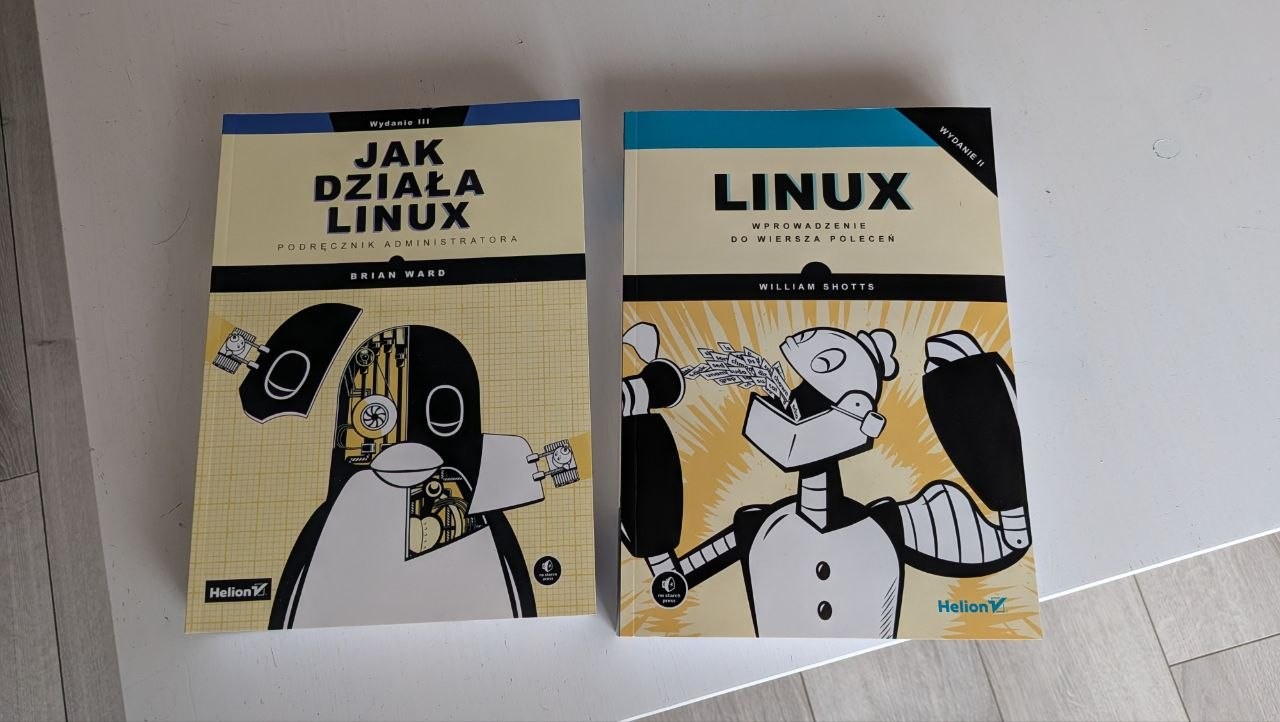
I bought a couple books about Linux, started reading the first one.

I have a project to move my Google Drive, OneDrive and Google Photos somewhere else. Nextcloud seems like the best solution, but I also like Immich as a replacement for Google Photos. That made me think about self-hosting. The Hetzner Storage Share looks nice because it's a cheap, managed Nextcloud, but not having access to the database feels like vendor lock-in and a possible friction point in the future, so I am thinking of renting a VPS. I also have a pretty beefy old PC at home, but it's currently damaged (I think either the motherboard or the PSU is dead, I didn't diagnose yet).
9

I'm looking for an Android app that strips EXIF from photos before I upload them somewhere. I really care mostly about removing geolocation. I searched on F-Droid, I didn't find much. Has anybody used Scrambled Exif ?

OK, but it DOES work in the background. I generally like GNOME's minimalism, but this is a bad design choice IMO. Maybe I need that AppIndicator after all. :)

On my first day on GNOME I missed Slack notifications for 4 hours. It was great, no distractions and laser focus on my work! ;)

27

For example Slack or Telegram or something else. The program has a single window, I click the "x" and it is closed. GNOME doesn't have a tray with program icons by default, I didn't install any extensions besides Vitals to monitor the CPU temperature. I don't even have a visible Dash. Just vanilla GNOME. In Windows, some programs will go to the background and will still be running when you close the window, usually there's a setting for that in each program. I wonder whether in GNOME I can do the same or if I should change my mindset and leave everything open at all times. This is more of a habit than necessity.

[-] steel_for_humans@piefed.social 34 points 2 weeks ago

Joplin not mentioned. It's like Standard Notes, but FREE, including cloud sync (many targets available). I used Standard Notes but their business model changed which drove me to look for alternatives and I landed with Joplin. Highly recommended!

48

I wanted to switch for several months but needed to sort out some things first. I'm a .NET dev (on Linux, crazy, I know). We migrated to .NET 8 (I want to upgrade to .NET 10 which is nowhere near the complexity level of moving everything from .NET Framework) last year and because .NET is now cross-platform, I could finally switch to Linux full time because my full tech stack is available here. It's not a 1:1 workflow, some things are done differently (for example I don't use IIS with self-signed certificates, I use Caddy; I don't use MSBuild, I run dotnet commands manually; SQL Server is running in a Podman container).

I chose openSUSE Tumbleweed because I live in the EU, there's the whole Buy European movement caused by Trump which I support. I tested Fedora Workstation first, I really really like it, it gave me less issues than openSUSE, but it's "American", sponsored by Red Hat who does business with Palantir, so sorry :( I should have considered Debian, too, I think it would have been easier, but openSUSE has newer packages and has that super cool Snapper integration which is a godsend to newbies such as myself who can break their system by doing something stupid. So far so good, I can't use OpenVPN 3 here, though, because the community package doesn't work properly (it expects DBUS to be named dbus, but for some reason openSUSE devs decided that non-standard dbus-1 is better). GSConnect doesn't work, either, the extension hasn't been updated enough and references some old parts which are not available in the cutting edge GNOME 49 on Tumbleweed ;) I believe both OpenVPN 3 and GSConnect would have worked on Debian out of the box. I could have also gone for LMDE, but I wasn't aware what it was and I only knew I didn't want Ubuntu, so Linux Mint was not something I wanted, either (I know it's not the same, but it's based on Ubuntu).

I read many times that your choice of DE is more important than your choice of distro. And to stick to your choice for at least three months before you hop to another one. I can't help but get a sort of buyer's remorse . That's when you make a choice, but other options are still available after. Makes you (me) think that maybe it was not the best choice, you know. But hopping too soon just teaches you to install Linux :D

I set up a 3-2-1 backup scheme for which I'm very happy now. I have Btrfs + Snapper on my system disk, then I have Restic (with resticprofile) to back up my user files (plus some configuration files from /etc) on a secondary disk and another backup in the cloud. Initially I wanted an image based backup of the system disk, because I've been using Macrium Reflect on Windows for many years. After some research it seems that Linux users have a different mindset and because programs keep their config in /etc (or sometimes ~/.config) you can just backup those files and in case your rootfs is so damaged you cringe when thinking of fixing it, you just quickly re-install the system, pull all packages (which list you can export into a .txt file) and then restore the configs.

I learned that everything in Linux is a file. Even CPU frequencies (/sys/devices/system/cpu/cpu*/cpufreq/scaling_cur_freq). And that everything in Bash is a stream. And that I love fish (I actually don't like fish, but I love the shell of that name).

I learned that systemd services are plain text files with super easy syntax. That BLEW MY MIND because in my .NET project I have a tool to create Windows Scheduler tasks and it's like some stone age tech in comparison. I have to re-compile to create a new service. In systemd I can type a new service in a text editor and make it run on a schedule with a CLI command.

I learned that many people hate systemd. I listened to a short history of how systemd came to be and apparently somebody was collecting Bitcoin in 2014 to hire a hitman to kill one of the creators of systemd. ๐Ÿคฏ I don't have a baggage, a month ago I thought you still use cron in Linux, so I don't have any feelings about that, I understand the concerns about centralization and complexity, but currently I'd say I like systemd. I barely know anything, though.

After first few days I actually reinstalled Tumbleweed to get systemd-boot instead of GRUB because I use LUKS encryption on all disks and I read that systemd + Secure Boot is better.

I use GNOME. KDE seems to too Windows-like in its UX and too complex (too many options and switches), but I would still like to give it a fair chance. I wish it was possible to switch between GNOME and KDE on the same machine without making the system garbage (mixed window types, settings, etc.). I know it's technically possible, but as far as I know it leaves "trash" and the OS sometimes gets confused and tries to display KDE (Qt?) windows in GNOME or something. I think it's better to reinstall, but let me know if I'm wrong.

I did not encounter any serious issues, the system is very stable, no crashes. I am able to work on it and do personal stuff.

[-] steel_for_humans@piefed.social 8 points 2 weeks ago

Thanks for telling me about Betterbird. I see I can run it at the same time as Thunderbird which naturally fits my workflow described above ๐Ÿ˜…

[-] steel_for_humans@piefed.social 7 points 2 weeks ago

I am thinking of self-hosting some stuff right now, but that's mainy OneDrive/Google Drive replacement and Google Photos replacement. I could maybe self-host Bitwarden, too. Email? Nope. I know there's A LOT of work with that, with the domains (so my emails don't get rejected by other parties), with spam filters and so on. I will leave that to the professionals, it's too important. File storage is for me, but email is for communication with others. So congratulations if you got that working :)

97

TL;DR tried to leave Gmail for Proton Mail, but ended up running them both simultaneously which created a mess. Later added Proton Pass over Bitwarden and SimpleLogin, but run into autofill bugs and a growing sense of vendor lock-in. I'm planning to consolidate everything into Mailbox.org, Bitwarden and either SimpleLogin or Addy and use a personal domain this time to avoid being locked in again. My fumble was never fully committing to one solution.

Sometime in 2018 I wanted to get off Google (Gmail). I did research and created a Proton account. I imported all my email from Gmail to Proton. It looked good. I bought a domain name, attached it to Proton, redirected all future Gmail emails to Proton to catch them all and update the addresses in the services that I use. I was also using Bitwarden at the same time.

After a few months I needed to look up some purchases in my email archive. I couldn't find them. I was doing it on my Android phone. I tried various combination. I KNEW what I bought and the keywords to find it. It was not there. Did Google lose my email?! Was I going crazy? No, it's just that the mobile Proton Mail app does not support fulltext search. I know why, but I still think it's doable the same way as in the web browser. Anyway... that was a deal breaker to me. But now I already had Gmail + Gmail imported into Proton Mail + emails I received while already on Proton. I started to look for ways to go back to Gmail but also to take my Proton mail with me. I set up Thunderbird with IMAP and started to move them around. I didn't finish that process because it was manual and there was just too much, I couldn't keep track of it properly. I just created a mess for myself with doubled emails, etc. Sigh. I went back to Gmail for a few years.

Then as I started using Thunderbird more and more I realized its fulltext search works across all inboxes even if the provider doesn't support it. I had the urge to give Proton another go. This time I was also already using SimpleLogin (before Proton bought them). I had a different personal domain. What I now created is that I have TWO inboxes (Gmail and Proton) and never moved fully away from Gmail. But I do use SimpleLogin for both. It was because I wasn't sure if I could commit 100% to Proton, given my past experience.

At this stage, I was still using Bitwarden. So I had Bitwarden + Proton Mail + Gmail + SimpleLogin. But I knew of Proton Pass, which a couple years earlier was lacking compared to Bitwarden, but supposedly has improved. I decided to give it a try after Proton bought SimpleLogin, because it seemed like it would be cheaper to user Proton Mail + Proton Pass + SimpleLogin, I wouldn't need Bitwarden anymore. I really like the UX of Proton Pass. The desktop app is pretty and functional. I love how 2FA codes in desktop web browsers are displayed automatically in a notification and I can use them by clicking a single button. Autofill on Android also works 90% of time. So I imported everything from Bitwarden into Proton Pass and decided to "test drive" for a bit. Part of the test was creating new logins in PP. At first I manually added them to Bitwarden. After some time, I didn't. I created a bunch of passkeys in PP, also part of the functionality test. So they are now not in Bitwarden.

Meantime, I started to be bothered by some Proton things. Some login forms don't autofill, for example a bank website that I use many times every month. I reported it to Proton on November 6 last year. They said they forwarded it to their team and that it will get fixed in the next release. It didn't. It still does not work 5 months later. In the meantime I stumbled upon several other websites where Proton Pass' autofill does not work. But at least Proton launched a few half-baked products since then. Fulltext search on Android doesn't work, either. It's been only 8 years or so, I can wait.

I also realized that I probably don't need an encrypted inbox. It's not even E2EE, because that's simply impossible in email domain (unless it's something like S/MIME or PGP, but both parties have to use it). It's only encrypted on rest. I am no activist nor a journalist. I just add extra work for myself, having to run Proton Bridge, having to use their apps, not having a working fulltext search in the mobile app, not having normal IMAP.

I feel like them launching more and more apps and services is going the way of creating an "ecosystem". I was happy having SL as an independent service, now it's also Proton. I feel like an Apple customer (been there), I see the garden walls being built around me and have an encroaching feeling of vendor lock-in.

I regret my choices. I did fumble. I want to go back.

I'm thinking of subscribing for Mailbox.org. I looked at Tuta (have to use their apps, not easy to export), Posteo (doesn't allow for custom domains) and FastMail (I had issues in 2018, don't remember what exactly, besides I want an EU product). Because of how butchered my Proton inbox is, I think the best approach will be to delete all Gmail messages from it (after I confirm they are still in Gmail) and then export all and import to Mailbox.org. Separately, export all from Gmail and also import into Mailbox.org. That should give me a clean slate. I will also change ownership of aliases in SL. Sadly, I used many passmail.com aliases which are probably bound to Proton Mail and I am not sure I can continue using them if I pay for SL, but not for Proton (though, my subscription is still valid for many months).

I want to migrate back to Bitwarden. Based on my search it's not possible to selectively import entries from Proton Pass to Bitwarden. Currently my Bitwarden vault is outdated, Proton Pass has many newer logins and other items and several passkeys. I think what I have to do is backup my Bitwarden vault (just in case) and then create a new empty vault and import everything from Proton Pass. I also need to re-create any PP passkeys in Bitwarden and either switch the websites to use that or add Bitwarden passkeys if a website supports more than one passkey.

I am also not sure about staying on SL. I am considering Addy, but it's run by just one guy, so I'm not sure about it. This time, I plan to buy another personal domain and use it for email aliases rather than to rely on the domains provided by the service. This way I can migrate in the future if I need to.

btw I also switched from Windows 11 to Linux

The core issue here is that I couldn't commit . I wanted to try things and instead of committing to one and sticking to it, I used both at the same time. Chaos.

I just need to get this off my chest. Thanks for reading. I appreciate if you have anything constructive to say.

53

Disclaimer: I tried searching for something like "useful programs", "useful packages", "useful tools", "recommended packages", etc. Don't see any posts like that, if this is a duplicate, then it's not intentional and my search skills have failed me.

Anyway, I was watching a YT video today and the guy launched a cool program in his terminal, I paused to see what he was running. It was btop, of course being new I never heard about it. Then I thought -- how many cool tools/packages are there, which people use, but I am not aware of?

So what do you like? What do you install on a fresh install? What are the most useful tools in your belt? What can't you live without on Linux?

Perhaps I'll find something useful :)

15
submitted 3 weeks ago* (last edited 2 weeks ago) by steel_for_humans@piefed.social to c/linuxquestions@lemmy.zip

cross-posted from: https://piefed.social/c/linux4noobs/p/1953356/my-pc-is-making-a-high-pitched-noise-like-coil-whine-only-under-linux

So I built a new PC a couple weeks ago. My old one broke one day (I think I helped it, but that's another story). I was happy to move from a stock Prism Wraith cooler that was LOUD and ANNOYING. I put a new AMD Ryzen 9 7900X in this box with a couple of new nvme drives (Samsung 9100 PRO and 990 PRO). The thing is silent under Windows 11. Silence at last!

Then I installed openSUSE Tumbleweed (from which I'm typing this) and as the post title says, something is making a high-pitched noise, like coil whine, when the system is mostly idle. I searched the web and the first suggestion is that Linux handles CPU power states (C-state) differently than Windows. Or, it could be the new disk(s), too. It's a fly in the ointment, I am very happy with the new PC, with how powerful and fast it is, I'm so far happy with openSUSE, but there HAD TO be SOMETHING to spoil the experience.

Has anybody had a similar problem? Any tips on how to troubleshoot it and not BREAK my computer?

EDIT: more info from the comments

I just use the Ryzen iGPU, don't have a dedicated GPU. I set the fan curves in BIOS, so it's the same across all OSes. I'm pretty sure it's not the fans. My main suspect is the CPU because the noise is there in openSUSE's installer, so even before anything touched the disks (they were straight from factory with no partitions). As soon as I launched the Tumbleweed installer I heard it. Not hearing it in Windows 11. I can hear it when the CPU is idle, if I start some program, run a compiler or even scroll fast in the web browser, there is no noise.

I had the same monitor for several years. I hear the noise from the PC case and I'm 100% sure about that. I used the same monitor with my previous PC and there was no noise, including in Fedora Workstation. This is a new PC.

The noise is audible in openSUSE's installer, that's the first time I heard it. So even before there was anything on either of those nvme disks, at that time they were straight from factory with no partitions.

I dual boot on this PC and the whine is not there in Windows 11, neither in BIOS. I have fan curves set in BIOS, so it's the same across OSes.

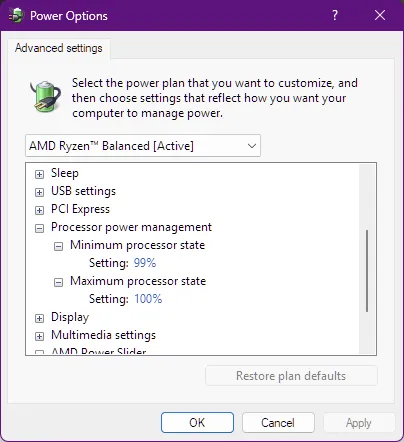
โœ… So I managed to troubleshoot and find the root cause. As suspected, it was the CPU, however I thought it was only the difference between how Windows and Linux manage its power profile. While troubleshooting, I ran hwinfo on my Windows install and also double checked the active power profile. It was set to the AMD Ryzen Balanced profile that was added automatically. If we look closer, it was set to always run in high performance mode so it never went into deep sleep and my Ryzen makes the whining sound only when in deep sleep (that would be the C6 state).

image

image

I think that Linux sets power efficient modes, even under performance*. The fix for me was not in the OS, but rather in UEFI BIOS. The magic setting for my motherboard (ASUS TUF GAMING B650E Plus WiFi) is at Advanced\AMD CBS\CPU Common Options\Power Supply Idle Control. It had to be changed to "Typical Current Idle". Now I can keep running the balanced profile in openSUSE, so the CPU doesn't operate at top frequency all the time and it is now SILENT, same as under Windows. :)

* at first I tried flipping between powerprofiles set balanced and powerprofiles set performance and for a minute I thought that was it, but not quite. Maybe balanced makes less sound, but still does it.

[-] steel_for_humans@piefed.social 6 points 3 weeks ago

No, it's not the fan. I have fan curves set up in BIOS and they're running below 700rpm when the system is idle.

36
submitted 3 weeks ago* (last edited 2 weeks ago) by steel_for_humans@piefed.social to c/linux4noobs@programming.dev

So I built a new PC a couple weeks ago. My old one broke one day (I think I helped it, but that's another story). I was happy to move from a stock Prism Wraith cooler that was LOUD and ANNOYING. I put a new AMD Ryzen 9 7900X in this box with a couple of new nvme drives (Samsung 9100 PRO and 990 PRO). The thing is silent under Windows 11. Silence at last!

Then I installed openSUSE Tumbleweed (from which I'm typing this) and as the post title says, something is making a high-pitched noise, like coil whine, when the system is mostly idle. I searched the web and the first suggestion is that Linux handles CPU power states (C-state) differently than Windows. Or, it could be the new disk(s), too. It's a fly in the ointment, I am very happy with the new PC, with how powerful and fast it is, I'm so far happy with openSUSE, but there HAD TO be SOMETHING to spoil the experience.

Has anybody had a similar problem? Any tips on how to troubleshoot it and not BREAK my computer?

EDIT: more info from the comments

I just use the Ryzen iGPU, don't have a dedicated GPU. I set the fan curves in BIOS, so it's the same across all OSes. I'm pretty sure it's not the fans. My main suspect is the CPU because the noise is there in openSUSE's installer, so even before anything touched the disks (they were straight from factory with no partitions). As soon as I launched the Tumbleweed installer I heard it. Not hearing it in Windows 11. I can hear it when the CPU is idle, if I start some program, run a compiler or even scroll fast in the web browser, there is no noise.

I had the same monitor for several years. I hear the noise from the PC case and I'm 100% sure about that. I used the same monitor with my previous PC and there was no noise, including in Fedora Workstation. This is a new PC.

The noise is audible in openSUSE's installer, that's the first time I heard it. So even before there was anything on either of those nvme disks, at that time they were straight from factory with no partitions.

I dual boot on this PC and the whine is not there in Windows 11, neither in BIOS. I have fan curves set in BIOS, so it's the same across OSes.

โœ… So I managed to troubleshoot and find the root cause. As suspected, it was the CPU, however I thought it was only the difference between how Windows and Linux manage its power profile. While troubleshooting, I ran hwinfo on my Windows install and also double checked the active power profile. It was set to the AMD Ryzen Balanced profile that was added automatically. If we look closer, it was set to always run in high performance mode so it never went into deep sleep and my Ryzen makes the whining sound only when in deep sleep (that would be the C6 state).

image

image

I think that Linux sets power efficient modes, even under performance*. The fix for me was not in the OS, but rather in UEFI BIOS. The magic setting for my motherboard (ASUS TUF GAMING B650E Plus WiFi) is at Advanced\AMD CBS\CPU Common Options\Power Supply Idle Control. It had to be changed to "Typical Current Idle". Now I can keep running the balanced profile in openSUSE, so the CPU doesn't operate at top frequency all the time and it is now SILENT, same as under Windows. :)

* at first I tried flipping between powerprofiles set balanced and powerprofiles set performance and for a minute I thought that was it, but not quite. Maybe balanced makes less sound, but still does it.

38

Most of those books seem to be targeted at experienced users, however there are a couple about working with the CLI and one about "how Linux works". I wish those books were in the lowest tier, it kinda makes sense. Perhaps somebody will find it useful.

view more: next โ€บ

steel_for_humans

joined 3 weeks ago