1181
you are viewing a single comment's thread
view the rest of the comments
view the rest of the comments
this post was submitted on 31 May 2024
1181 points (98.8% liked)
Comic Strips
23906 readers
685 users here now
Comic Strips is a community for those who love comic stories.
Rules
-
😇 Be Nice!
- Treat others with respect and dignity. Friendly banter is okay, as long as it is mutual; keyword: friendly.
-
🏘️ Community Standards
- Comics should be a full story, from start to finish, in one post.
- Posts should be safe and enjoyable by the majority of community members, both here on lemmy.world and other instances.
- Any comic that would qualify as raunchy, lewd, or otherwise draw unwanted attention by nosy coworkers, spouses, or family members should be tagged as NSFW.
- Moderators have final say on what and what does not qualify as appropriate. Use common sense, and if need be, err on the side of caution.
-
🧬 Keep it Real
- Comics should be made and posted by real human beans, not by automated means like bots or AI. This is not the community for that sort of thing.
-
📽️ Credit Where Credit is Due
- Comics should include the original attribution to the artist(s) involved, and be unmodified. Bonus points if you include a link back to their website. When in doubt, use a reverse image search to try to find the original version. Repeat offenders will have their posts removed, be temporarily banned from posting, or if all else fails, be permanently banned from posting.
- Attributions include, but are not limited to, watermarks, links, or other text or imagery that artists add to their comics to use for identification purposes. If you find a comic without any such markings, it would be a good idea to see if you can find an original version. If one cannot be found, say so and ask the community for help!
-
📋 Post Formatting
- Post an image, gallery, or link to a specific comic hosted on another site; e.g., the author's website.
- Meta posts about the community should be tagged with [Meta] either at the beginning or the end of the post title.
- When linking to a comic hosted on another site, ensure the link is to the comic itself and not just to the website; e.g.,
✅ Correct: https://xkcd.com/386/
❌ Incorrect: https://xkcd.com/
-
📬 Post Frequency/SPAM
- Each user (regardless of instance) may post up to five (5 🖐) comics a day. This can be any combination of personal comics you have written yourself, or other author's comics. Any comics exceeding five (5 🖐) will be removed.
-
🏴☠️ Internationalization (i18n)
- Non-English posts are welcome. Please tag the post title with the original language, and include an English translation in the body of the post; e.g.,
Sí, por favor [Spanish/Español]
- Non-English posts are welcome. Please tag the post title with the original language, and include an English translation in the body of the post; e.g.,
-
🍿 Moderation
- We are human, just like most everybody else on Lemmy. If you feel a moderation decision was made in error, you are welcome to reach out to anybody on the moderation team for clarification. Keep in mind that moderation decisions may be final.
- When reporting posts and/or comments, quote which rule is being broken, and why you feel it broke the rules.
Banned Artists
The following artists are banned from the community.
- Jago
- Stonetoss
It should be noted that when you make reports, it is your responsibility to provide rational reasoning why something should be removed. Saying it simply breaks community rules is not always good enough.
Web Accessibility
Note: This is not a rule, but a helpful suggestion.
When posting images, you should strive to add alt-text for screen readers to use to describe the image you're posting:
Another helpful thing to do is to provide a transcription of the text in your images, as well as brief descriptions of what's going on. (example)
Web of Links
- !linuxmemes@lemmy.world: "I use Arch btw"
- !memes@lemmy.world: memes (you don't say!)
founded 2 years ago
MODERATORS
They're great, now if apple could concede that right click is an important thing that's not going away and not relegate it to a corner barely larger than my finger then they'd be perfect.
EDIT: I forgot the default way to right click on Mac is two finger click, I changed it in the settings when I first got it to be click in the bottom right. If you've gotten used to two finger click good on you, but point still stands for us who like the "right" way.
I’m not sure I understand your complaint – if you two-finger tap anywhere on an Apple trackpad made since around 2009, it’s interpreted as a right-click.
Reply to edit: “I forgot that I changed it to make it worse and I’m mad at Apple about it” is maybe the most Lemmy comment I’ve ever read
Not an Apple user, and curious: If you double click a movie file it does not open it but gives you the menu? How do you open it? Triple click? Or one click? If one, how do you just mark it?
Clicking once with 2 fingers on the pad is what they meant
Anything you do while touching the trackpad with one finger at a time is the same as though you were using a mouse. Tap once to select, tap and drag to move, double tap to open.
If you tap with two fingers on the pad at the same time, it reacts as if you’ve right-clicked. I usually use my index and middle finger.
Interesting, thank you!
Oh yeah, I changed it so long ago I forgot that's the default. Changed it to bottom right corner in the settings when I first got it since I am used to windows laptops, but the area for the bottom right corner that apple designates is very small.
Yeah, that's easy to miss since Apple removed the super helpful tutorial shorts in the touchpad settings. The new menu is less clear imo.
Sorry, the great prophet Jobs (pbuh) has decreed that one button is all you need.
I am using a Mac touchpad on a laptop right now and no matter where I do the right-click action (extremes of upper-left, upper-right, lower-left, and lower-right, center-of-quadrant again for all of those, true center, etc.) it always takes the click. One-finger clicking is equivalent to "left-click" on Windows while two-finger clicking is equivalent to "right-click", or alternatively hitting control while one-finger clicking will do the trick. I've done this for years and years and it's always worked for me before...
The default is for two finger click, I forgot that's the default way since I changed it so long ago, but you can change it to a click in the bottom right is right click, like on a windows laptop, in the settings. it's just the area in the bottom right that qualifies as the corner is very small.
I did a search and there are not many ways to change that, unfortunately:-(. Macs often let you do customization settings, even if you have to copy/paste a command-line to do it, but not this time. There is supposedly an app, but I wouldn't recommend downloading strange apps from an unknown maker.
I did find out that there is an Accessibility -> Pointer Control option that will let you assign any hotkey you want rather than click, like F11 by default is left-click and F12 is right-click. I am not sure if you can do just the right but not the left. Though remember, already by default you can hold down the control key while left-clicking, and that is interpreted as a right-click action. I had used a Windows laptop in combination with a Mac OSX desktop at some point, so I hated the damn trackpad of the former, but I had already gotten used to the control-click functionality of the latter, and then when these force-trackpads came out it was a more natural move for me who was already into the zone there.
Plus as people are saying it's noice hardware - the smooth glass feeling and all:-).
The trackpad click-with-two-fingers is not so bad - at least for me, since I rarely use it and I just add one extra finger to the click (I even use the 3-finger expose swipes sometimes, though I never even recall what the 4-finger ones do, and yet the pinch-and-zoom is nice:-)
I am sorry that it isn't working well for you, but I hope you can find something more to your liking:-). At worst, perhaps you can put Linux onto your existing Mac hardware and therefore configure it more directly?
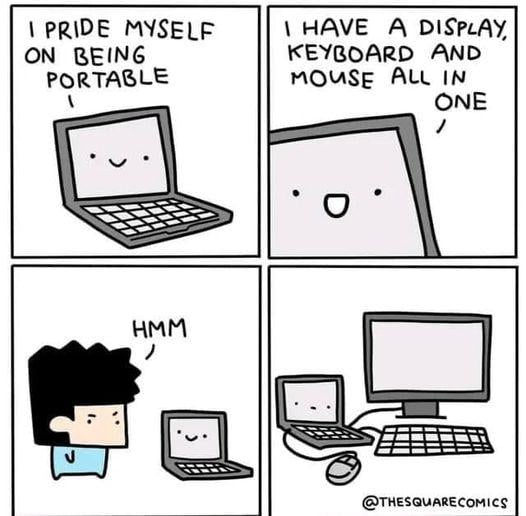
Thanks for the pointers! Like the meme though I keep it plugged into a mouse, keyboard etc. so don't really use it but when I do it's good except that one issue.
I wish, it's my work computer though and even though all the software I need and the software I'm developing runs on Linux, I think IT would get mad If I loaded Linux on it. Also why I probably can't do any of the other changes you suggested
Oh I see. I use my Macs (at home + work) as daily drivers, though I rarely use the right-click action iirc - so much of working on a Mac only requires one left-click. Also I use the Terminal to log into a work Linux, so a lot of keyboard interaction too, and like alt-tab and such.
But it sounds like your UX is entirely different: if you rarely use the Mac itself, and/or then use an external mouse the vast majority of the time, and even then don't do right-click actions constantly, then I see what you mean: you almost may not even have trackpad experience!?:-D It would then be harder to retain yourself to do differently, and the few times something doesn't work would stick out in your mind more in that case. If you think you'll keep needing to use a Mac setup in the future, you might try to force yourself to get used to it - like pick a slow day of the week and don't allow yourself to use the external mouse and only use the trackpad. Like learning to type in QWERTY rather than hunt and-peck, building habits takes time but does have a pay-off:-). Even if you don't need to do this, it could make the whole experience more pleasurable i.e. less painful for you! Ofc you know your setup far better than I, it was just a thought, in case it helps:-).