this post was submitted on 14 Jun 2024
181 points (97.4% liked)
Linux
65497 readers
271 users here now
From Wikipedia, the free encyclopedia
Linux is a family of open source Unix-like operating systems based on the Linux kernel, an operating system kernel first released on September 17, 1991 by Linus Torvalds. Linux is typically packaged in a Linux distribution (or distro for short).
Distributions include the Linux kernel and supporting system software and libraries, many of which are provided by the GNU Project. Many Linux distributions use the word "Linux" in their name, but the Free Software Foundation uses the name GNU/Linux to emphasize the importance of GNU software, causing some controversy.
Rules
- Posts must be relevant to operating systems running the Linux kernel. GNU/Linux or otherwise.
- No misinformation
- No NSFW content
- No hate speech, bigotry, etc
Related Communities
Community icon by Alpár-Etele Méder, licensed under CC BY 3.0
founded 7 years ago
MODERATORS
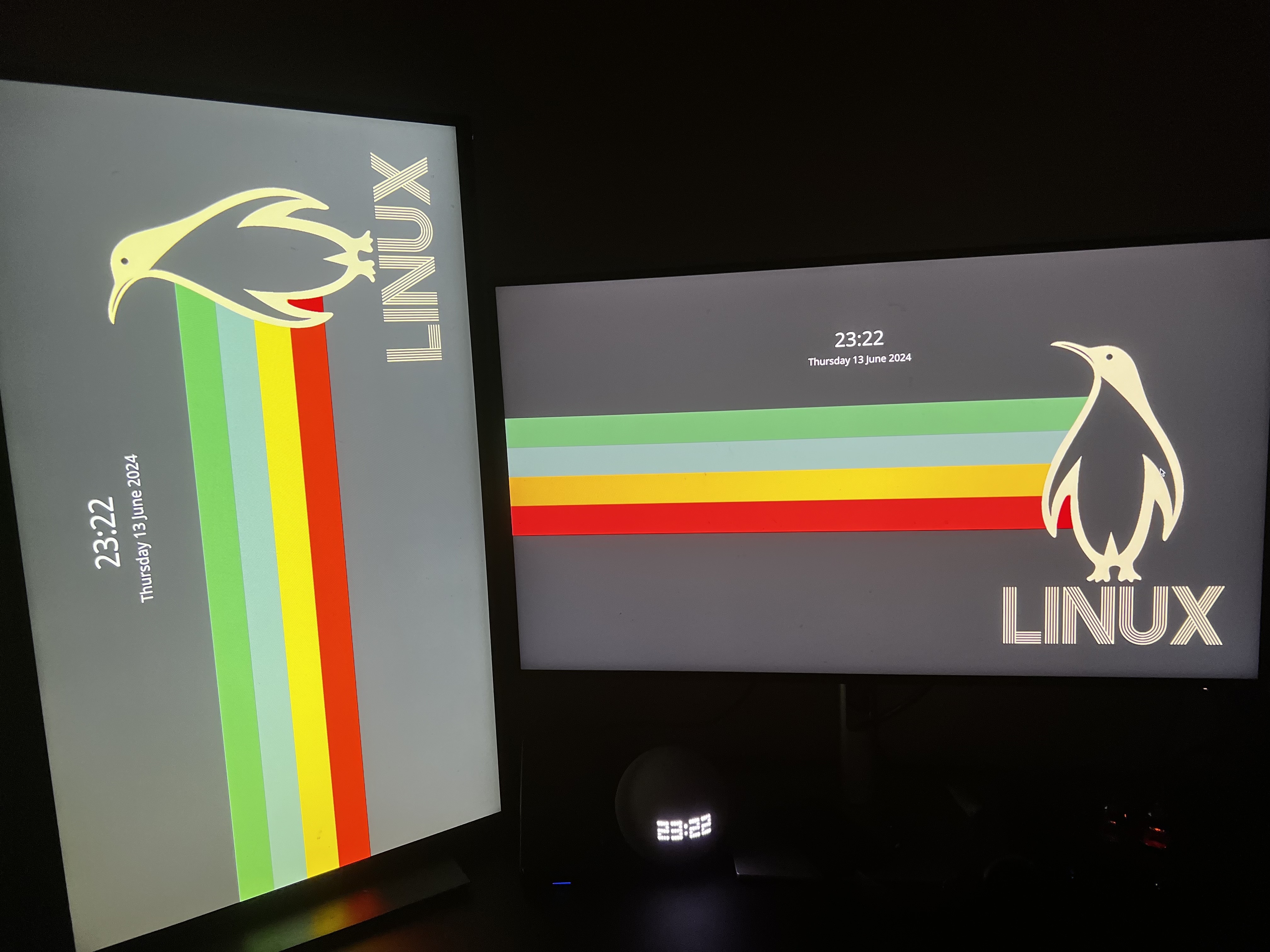
If you're using Wayland, you can go to Settings -> Colors & Themes -> Login Screen (SDDM) and click "Apply Plasma Settings..."
If you're using X11, it looks like you'll have to resort to hacky scripts, unfortunately.
Source: https://discuss.kde.org/t/how-to-change-monitor-layout-and-orientation-in-sddm/3377
Unfortunately, I'm having to use X11 because of work (context). Thanks for the help!
I suppose xrandr can help you here: See the Arch wiki about xrandr
Oh, I didn't know that button existed. Great! Even though I just tried it and it didn't apply my rotation settings correctly.
I’m using Wayland, where do I find this settings gui?
This is the system settings application for the KDE desktop environment.
Ah, so being on Hyprland means I can’t really gain access to this, right?
Correct. Unfortunately, it's something that each desktop environment or window manager has to implement themselves. But all the button is doing is moving some config files around, so you can probably do some digging to figure out what it's copying to where.
Yeah, I’ve largely figured out how to change all these settings from configs for myself, just always on the lookout for a nice gui. I’m slowly working to make a Linux experience I can install for my relatives that makes the transition from crapware Windows relatively painless.
XDG_SESSION_THEME=KDE got my hyprland config to work on everything except the cursor (other than in Firefox/steam for some reason). Took me way too long to find the old reddit post that had this tip, so I hope it helps!
Okay grandma, let's get you to bed
Yeah that difference in configuration definitely makes it so much better, it completely outweighs the fact that Wayland does proper multi-monitor VRR, fractional scaling, HDR and much more.
Not OP comment but I had no idea Wayland supported all of that. Thanks for sharing! I really need to leave my Linux bubble more often.
And now you know why it’s so funny to read people on the internet exclaiming that X11 is so much better despite its lack of development…
Literally yes. And you don't even need to know the exact pixel resolution of the TV.
Edit: Here are the problems with you "Wayland isn't good enough" people.
First, you don't use Wayland, so you don't even know if it's fixed whatever weird issue you encountered with it before or if it supports a niche use case, for example.
Second, Wayland won't get good enough for you until you start using it and reporting bugs. You think X11 was a bed of roses when it first started? Or do you think they bumped the version number 11 times for fun?
Bingo. So many complaints I’ve seen about Wayland have been from Nvidia users who tried it three years ago when the driver support was beyond fucked. I get Linux development moves slow sometimes but holy shit…
Uh, all that button does is write your configuration to the sddm config. Of course you can also do that manually.
wlr-randr
You can't be this stupid, Wayland also uses a config file, you just have a GUI button to copy the configs from inside your session to the login screen. Or do you think the button recompiles the login screen with a different configuration?
Ironically SDDM itself still runs on X11 afaik, Wayland support is still experimental.
I think you have to manually enable it (may depend on your distro/DE) but SDDM works fine with Wayland as it stands now.
In Wayland, the compositor is the window server ( the equivalent of Xserver ). What you are looking for has to be a feature of the compositor and it is.
As others have said below, wlroots based compositors offer wlr-randr. There is also gnome-randr. For KDE, there is Kscreen-doctor. For X ( the window server being used by SDDM here ), there is xramdr.
Now, some people may see it as a problem that we have multiple Wayland implementations. I am mostly not fighting that battle. I will say that I hope these are not the same people that winge about systemd though and push for alternate init systems. I hope nobody that thinks MUSL is cool Is clinging to X11.
I would prefer that there was a common configuration standard for this stuff on Wayland. It will probably come eventually. Maybe as part of the freedesktop.org stuff.
Generally, I believe the Linux ecosystem has been stronger in areas where there has been competition between implementations ( even compilers ). I hope that Wayland will be one of those areas. As the core problems get fixed, the pace of innovation will increase. I believe we are already seeing that. There are more examples every day of things Wayland can do that X11 cannot. Let’s hope for more of that.
You left a very gracious reply so let’s not fight.
I see a certain amount of irony in the overlap between the group of people ranting that Wayland has too many implementations and the group demanding more implementations of everything else. So that was my point.
Certainly we can agree though that there is nothing wrong with demanding more of both.
One my favourite new distros, Chimera, uses both Wayland and dinit (and Turnstile ).
I am interested to see where the diversity that Wayland provides goes actually. Have you seen this?
https://github.com/CuarzoSoftware/Louvre
Not sure if you're a troll, but if you're serious, nothing I say is going to change your mind, so I won't bother.
I never configured anything on X with a DE, let it be KDE, Gnome or Cosmic, but configure everything with config files I can just copy on sway. It has nothing to do with X or Wayland, but the DE/WM you use.