23
submitted 10 months ago* (last edited 10 months ago) by Psycho84@lemmy.world to c/linux_gaming@lemmy.world

I got this Beelink mini pc from Amazon planning to hook it up to my living room TV and play movies and stream TV with. And I was shocked and amazed to discover that this little thing could run games like Hi-Fi Rush and MGSV:PP on max settings! Sure the fans made it sound like a small jet engine, but it never skipped frames or lagged on me even once! I know it's not a power house: it couldn't run Yakuza Zero or Neir Automata very well. But I was still thrilled with what it could do!

Well it shipped with Windows 11, and I finally decided to fix that. A couple days ago I switched over to Mint, tho I'm running Kubuntu now. The switch was quick and painless, and honestly getting used to Linux has been pretty fun! But now it runs a lot of my games like a slide show. I've been digging at this for a few days now, updating drivers and setting up Proton. I've found a lot of helpful guides and stuff on line, but very little about the hardware I have in this situation. Apparently AMD processors are great for Linux, but I feel like it's not working with the integrated graphics card. Tried to find the right driver on their website, but I haven't had much luck. So, here's hoping the community can help. Any tips for a newbie?

CPU: AMD Ryzen 7 5700U (16) @ 4.37 GHz | GPU: AMD Lucienne [Integrated]

UPDATE:

Thanks again to everyone so far that's offered advice, but it hasn't seemed to have helped much..

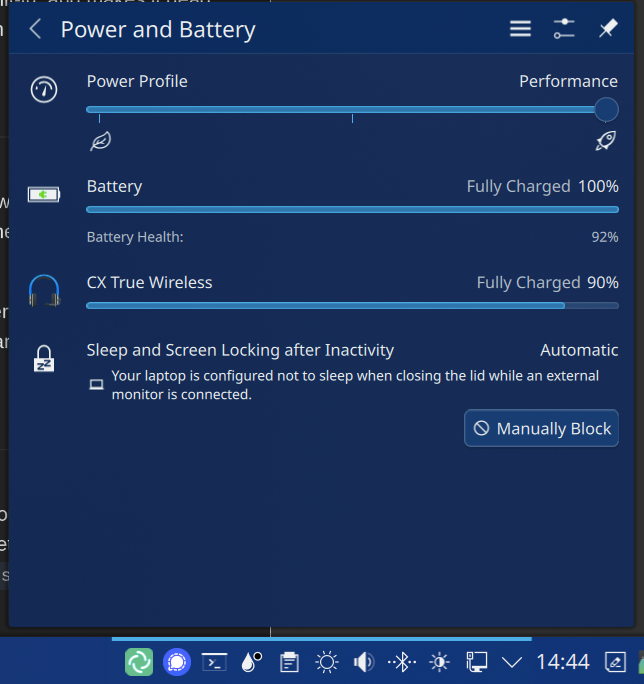
I made sure the power mode is set to Performance, and turned the settings all the way to their lowest at 1080p. Someone had suggested using Flatseal to check permissions, but steam did not show up there, so it was seemingly a dead end. I even switched to Bazzite.

But I'm still only getting 10fps at most, regardless of graphic settings. I'm not really sure what else to do at this point.

2nd UPDATE:

Potential success! BananaTrifleViolin asked if the games were running in 4k, which I made sure they weren't. But then I got to thinking about my main desktop display. It defaulted to my TV's 4k size, and the game was running in full screen...

So I fixed that and launched Hi-Fi again to test, and managed to get a stable 30fps! Now to figure out how to make this better, lol

FINAL UPDATE:

So, I'm not done tinkering with settings and stuff, I would still like to get the fps higher. But I'm still gonna call this a win here.

Thanks to everyone's help, I've got Hi-Fi running and a smooth 30fps with no input lag! More over, I took this advice to Yakuza to see if this machine could run it now. Sure did! On low settings, I got 30+fps! I'm trying a bunch of other games in my library now, but yea: this is a win!

top 16 comments
sorted by: hot top controversial new old
[-] DaPorkchop_@lemmy.ml 4 points 10 months ago

You shouldn't need to download any graphics drivers, Ubuntu (and pretty much every other distribution) ships with the open-source AMD driver stack by default, which are significantly better than and less hassle than the proprietary drivers for pretty much all purposes. If you're getting video out it's almost certainly already using the internal GPU, but if you're unsure you can open a terminal and run sudo apt install mesa-utils and then glxinfo -B to double-check what is being used for rendering.

[-] Psycho84@lemmy.world 0 points 10 months ago

Yup, it lists AMD radeon graphics as what's in use. The visuals all look fine, no glitching or artifacting, but even with the tuning I've done so far I can barely get the frame rate above 20fps.

[-] DaPorkchop_@lemmy.ml 4 points 10 months ago

Framerate above 20 in what with what settings? That's kinda key information :P

[-] BananaTrifleViolin@lemmy.world 2 points 10 months ago* (last edited 10 months ago)

I have the same device and have had no issues with drivers or games. I also wiped Win 11 and have Linux on there.

I started with Nobara and it worked immediately and been running with that for nearly 18 months. I have recently (as in this week) switched to OpenSuSE after my Nobara install had issues, and again gaming is fine.

I'm not sure about Mint or Kubuntu but I can't see why either would have issues. The drivers should be within the kernel; I haven't needed separate drivers. I used KDE on both Nobara and on OpenSUSE without issue.

As you've experienced, I been impressed with the level the graphics can get to. Largely medium settings at 1080p for many games. I have played Cyberpunk 2077 on this on a mix of low to medium settings.

This may be too basic question but you're not playing games at 4k are you? The desktop can be at 4k but the games need to be set to less. You should be able to play 3D games on it, and I'd expect Yakuza Zero to play fine. The device is good with a 4k desktop and 4k video, but 4k 3D games is way more of an ask and you need to bring games down to 1080 (or even 720p if you want to push up some of the other game options).

EDIT: BTW if you have a gaming desktop you can stream games to this miniPC in 4k. I switched to playing Cyperpunk via steam streaming and it looked incredible.

EDIT2: One thing that is generally important is to install gstreamer and available codecs. They categorise them as "Good", "Bad" and "Ugly". Often the "good" category codecs are installed but sometimes the more proprietary codes in the "ugly" category are not (they are "Ugly" due to their licenses but are still excellent quality). I don't believe it makes a difference to gaming but I certainly noticed issues with video. OpenSuSE doesn't install proprietary codecs by default. Nobara did (I think) but I'm not sure about Mint and Kubuntu's approachs.

EDIT 3: Just wanted to highlight another important point mentioned elsewhere in this thread by just_another_person@lemmy.world. KDE defaults to balanced power mode for me and that certainly does impact the GPU performance. You need to change it to Performance mode in the power settings. That can either be done from the "Power and Battery" area in the task tray or in the "Power Management" section of the KDE Settings app (near the bottom of the list in the "System" group).

[-] cyberwolfie@lemmy.ml 1 points 10 months ago

Are you running games via Flatpaks and have not given the Flatpak permission to use GPU acceleration? That has severly slowed down games on my similar AMD-based Minisforum PC. If you are, you can use Flatseal to easily adjust settings.

[-] just_another_person@lemmy.world 0 points 10 months ago* (last edited 10 months ago)

If it's running an AMD APU, you need to make sure that your power profile is set to "Performance" and not something like "Power Saver". I know KDE has a lot of issues with power profile management since they nixed the quick settings awhile ago, but I think in your settings there is a place to choose your preferred settings. Limiting the power on those APUs significantly hampers it's ability to play games.

If you're going to be gaming, you may want to switch to a distro that does semi or rolling releases. Latest Kubuntu is still on kernel 6.8, and there are MASSIVE performance improvements between that and 6.15 which something like Fedora is running by default. That, and many updated versions of the Mesa drivers.

[-] gnuplusmatt@reddthat.com 1 points 10 months ago

what exactly got nixed? Its all right there on the sys tray with a handy slider

[-] just_another_person@lemmy.world 1 points 10 months ago

There have been issues with the default power profiles interface and the AMD P-state manager for many KDE 6 versions depending on the kernel versions (I think 6.9+). THEN the power-profiles-daemon project was archived without notice, so I believe that's why they disabled/removed the quick menu for it for awhile, but since I believed they moved to the upower managed project and put it back in. Been a bit since I've used KDE, so unsure of the eventually fixed it.

[-] Korhaka@sopuli.xyz 0 points 10 months ago

Do they all come with windows? I was thinking of getting the EQ14 but don't want to give Microsoft anything.

[-] ProdigalFrog@slrpnk.net 1 points 10 months ago

You could try to pick up a used one second hand.

[-] SkaveRat@discuss.tchncs.de 0 points 10 months ago

Yeah, mine was full of wasps instead

[-] HelloRoot@lemy.lol 1 points 10 months ago

Oh man the reddit culture of irrelevant but funny comments has arrived. The only thing missing it being the top voted comment.

[-] underscores@lemmy.zip 0 points 10 months ago

Idk why you're down voted, let's get this shit nipped in the bud while Lemmy is still growing

[-] i_am_tired_boss@lemmy.world 0 points 10 months ago

Yes. We should start banning people for having fun.

[-] underscores@lemmy.zip 1 points 10 months ago

You're winning the argument against the giant man of straw you've made

[-] ShinkanTrain@lemmy.ml 1 points 10 months ago

Still better than coming with Windows

this post was submitted on 14 Jul 2025
23 points (100.0% liked)

Linux Gaming

25949 readers
65 users here now

Discussions and news about gaming on the GNU/Linux family of operating systems (including the Steam Deck). Potentially a $HOME away from home for disgruntled /r/linux_gaming denizens of the redditarian demesne.

This page can be subscribed to via RSS.

Original /r/linux_gaming pengwing by uoou.

No memes/shitposts/low-effort posts, please.

Resources

Help:

Launchers/Game Library Managers:

General:

Discord:

IRC:

Matrix:

Telegram:

founded 2 years ago
MODERATORS