It’s almost exactly a copy of reddit

The magic of reddit isn't just the structure of the website, it's the fact that there are so many people posting to diverse niche subjects. Although one structural thing lemmy is really lacking is the wiki and post flare components; those help give experts a reason to make effortful contributions as they do not fade into the ether after a few days.

That said, if reddit was new in 2025 or 2020, I don't think it would take off as much. It gained popularity in a previous time of the internet and is now coasting off that.

it generates an html preview in a sidebar.

the benefit over any other 2 column editor is that geany is a real text editor with lots of shortcuts, configs and tools. so the editing part is a lot better. markdown is just kind of tacked on though.

If by GUI you mean WYSIWYG, I don't know of any! Very mysterious to me why this has not been properly taken on given the popularity of markdown.

Once every year or so I check out everything that's available and try out any new or upgraded packages I can find. All have at least one of the following issues:

  • Massive bloat, often electron is significant culprit
  • Stuck on the 2 column editor concept, generally with only rudimentary markdown implementation
  • Fly by night new projects which are quickly abandoned in beta state
  • Only want to access files within a certain subdirectory which may or may not be configurable; this is rarely the only problem but it's very common in the PKM-type packages

I never quite got it to work properly but Zettlr suits some people. You might be able to cobble something together in Codium. Both those have the bloat issue. There are some self hosted browser-based editors if you are interested in that sort of project. The best and closest I have found is Joplin but it isn't actually a markdown editor. I wish someone would spin an editor off from its code base; surely the skeleton is there.

I used to use typora; it does have a really nice convert web->markdown. I think that it is done by some javascript or something because the other tools that have comparable quality I can think of off the top of my head are obsidian, joplin clipper and a couple of firefox extensions. I agree that in my experience pandoc and a couple other cli tools didn't produce such nice results.

I also think in all those cases the browser is doing some of the work because it renders the page, discards a lot of irrelevant stuff, then you copy/convert just a selection portion of what's visible. Whereas if you, for example, grab a raw html page through curl and send it to pandoc, none of that is done. You probably aren't using Select All when you copy a page to typora, but pandoc would be faced with the entire page. I don't know if there is a way to access the Reader View from the terminal but it would go a distance to cleaning up your pandoc conversion if you could start from there (for those sites on which it's available).

I tried and failed to do the same thing but it's not markdown's fault. No matter how many bells and whistles markdown would get, the issue is in the conversion from html part.

Sorry I was trying to follow your meaning, because the example of absent rich text you gave was underlines. There is already basic text formatting support such as strong, emphasis, headings and links.

You could style any, all or none of those to have underlining. Whatever chosen rendering, they all have meaning independent from the applied style. What you are asking for is to have something that is purely a display style without any structural value. This is not coming to markdown any time soon. Hardly anyone uses underline as its own thing in html anymore, for good reasons.

Maybe this article will help to further explain.

Native SVG handling would be completely out of scope. The point of markdown is that it is supposed to be understandable in its plain text format. SVG is incompatible with that. The closest thing would be like mermaid charts but I think it's quite a stretch even then.

I think you should just use HTML, it has a much larger array of tools that would suit your needs. Markdown is purposely constrained because it enables much more portability.

When I do free tech support for someone who I think could have solved it themselves I just make them solve it themselves by asking questions. "What information do you have?" "What have you tried?" "What does the error say?" "What do you think the error means? Is it giving a hint?" "When did you start having the problem?" "What can we eliminate?" "What did a search search suggest?" "What does the documentation say?"

"Did you try rebooting, reconnecting?"

My personal bias is being pro markdown. I do not know groff so below is based on some inferences on my part.

But I don't think markdown is suitable for man pages, which contain specific kinds of information structured in a prescribed way. Markdown doesn't and can't know about these.

As I understand it, because of using a more sophisticated structure than MD, its possible to do things like:

  • shell completion can be generated automatically from the man pages.
  • a website like mankier.com which renders man pages in HTML and adds hyperlinks every time an option or argument

That's not rich text. Rich text is when a format is applied without structural reason.

You could have a markdown interpreter that displayed **this** *this* or _this_ using any arbitrary format. You could change the color, weight, border, drop shadow, opacity, mouse over effects, font face... Any attribute.

Lemmy has conventions but all * really means is emphasis.

If you want to save a website use html

Someone can correct this but iirc some implementations of markdown have image options like this:

![alt text](/path/to/IMG.png|200px "description text")

Others put the size in { } after the main image item.

Rich text is contrary to the structural focus of markdown. Why should it be added?

There are a couple of apps on f droid that implement this with SMS.

17
submitted 8 months ago* (last edited 8 months ago) by linuxPIPEpower@discuss.tchncs.de to c/firefox@lemmy.ml

I find Firefox Translator doesn't pick up a lot of pages. The location bar button doesn't appear.

It works if I access via the hamburger menu. It is very slow to have to go via the menu for each individual page. I find no shortcut key or anything.

Sometimes this will correctly guess the original language but often not. It is saying pages are English even when they have little to no english, even using different alphabets.

Is there something the website admins can do to tell firefox what language it is? Encoding? Meta tag?

Can I force the location-bar translate button to persist on all pages regardless of what language it thinks the page is in? Then I could save going through the menu.

Here is an example: https://cn.chinadaily.com.cn/

14
submitted 8 months ago* (last edited 8 months ago) by linuxPIPEpower@discuss.tchncs.de to c/linux@lemmy.ml

I have a lowend netbook with debian-type linux only (no dualboot). Power management should be via XFCE4's xfce4-power-manager-settings.

I'm having weird behavior with suspend and trying to identify/troubleshoot it. It seems to be usually draining power and never charging when the lid is closed for many hours.

I tried explicitly entering power off, hibernate and suspend followed by unplugging then leaving it a few hours but couldn't replicate. It seems to be doing something on its own after being unplugged a long time.

What logs can I look at to see when my device changes its power modes, what were the triggers, what settings are governing it etc?

I can't tell if it's a software issue or there is some sort of power saving thing going on in the hardware or what.

Just hoping for some investigation tips here, I know its not enough info to solve.

Edit to clarify no dual boot.

21

I want to move a directory with a bunch of subdirectories and files. But I have the feeling there might be some symlinks to a few of them elsewhere on the file system. (As in the directory contains the targets of symlinks.)

How do I search all files for symlinks pointing to them?

Some combination of find, stat, ls, realpath, readlink and maybe xargs? I can't quite figure it out.

25

I have 2 directories which both have stuff in them:

  • /home/user/folderApple

  • /mnt/drive/folderBanana

I want to mount folderBanana onto folderApple like this:

sudo mount --bind "/mnt/drive/folderBanana" "/home/user/folderApple"

But I still want to be able to access the contents of folderApple while this is activated. From what I am reading, binding the original directory to a new location should make it available, like this:

mkdir "/home/user/folderApple-original"
sudo mount --bind  "/home/user/folderApple" "/home/user/folderApple-original"

But this just binds /mnt/drive/folderBanana to /home/user/folderApple-original as well. I tried reversing the order and result is the same.

How do I tell mount to look for the underlying directory?

I am happy to use symlinks or something else if it'll reliably get the job done, I am not wedded to this mechanism.

(The purpose of all this is that when an external drive is connected, I can have the storage conveniently available, but when it is not connected, the system will fallback to internal storage. But then I will want to move files between the fallback and external locations when both are available. So I need to see both locations at once.)

20

Is there anyway to pass terminal colors through a pipe?

As a simple example, ls -l --color=always | grep ii.

When you just run the ls -l --color=always part alone, you get the filenames color coded. But adding grep ii removes the color coding and just has the grep match highlighting.

Screenshot of both examples:
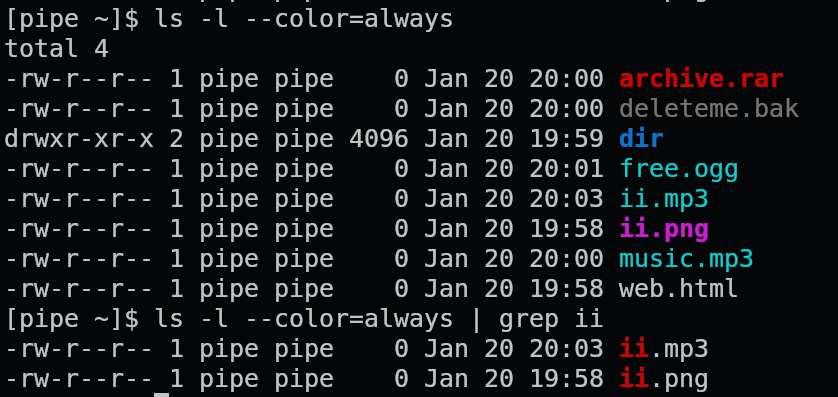
In the above example I would want ii.mp3 and ii.png filenames to retain the cyan and magenta highlighting, respectively. With or without the grep match highlighting.

Question is not specific to ls or grep.

If this is possible, is there a correct term/name for it? I am unable to locate anything.

40

Once again I try to get a handle of my various dotfiles and configs. This time I take another stab at gnu stow as it is often recommended. I do not understand it.

Here's how I understand it: I'm supposed to manually move all my files into a new directory where the original are. So for ~ I make like this:

~
  - dotfiles
      - bash
         dot-bashrc
         dot-bash_profile
      - xdg
            - dot-config
                user-dirs.dirs
      - tealdeer
            - dot-config
                - tealdeer
                       config.toml

then cd ~/dotfiles && stow --dotfiles .

Then (if I very carefully created each directory tree) it will symlink those files back to where they came from like this:

~
  .bashrc
  .bash_profile
   - .config
        user-dirs.dirs
      - tealdeer
          config.toml

I don't really understand what this application is doing because setting up the dotfiles directory is a lot more work than making symlinks afterwards. Every instructions tells me to make up this directory structure by hand but that seems to tedious with so many configs; isn't there some kind of automation to it?

Once the symlinks are created then what?

  • Tutorials don't really mention it but the actual manual gives me the impression this is a packager manager in some way and that's confusing. Lots of stuff about compiling

  • I see about how to combine it with git. Tried git-oriented dotfile systems before and they just aren't practical for me. And again I don't see what stow contributing; git would be doing all the work there.

  • Is there anything here about sharing configs between non-identical devices? Not everything can be copy/pasted exactly. Are you supposed to be making git branches or something?

The manual is not gentle enough to learn from scratch. OTOH there are very very short tutorials which offer little information.

I feel that I'm really missing the magic that's obvious to everyone else.

72

Title is TLDR. More info about what I'm trying to do below.

My daily driver computer is Laptop with an SSD. No possibility to expand.

So for storage of lots n lots of files, I have an old, low resource Desktop with a bunch of HDDs plugged in (mostly via USB).

I can access Desktop files via SSH/SFTP on the LAN. But it can be quite slow.

And sometimes (not too often; this isn't a main requirement) I take Laptop to use elsewhere. I do not plan to make Desktop available outside the network so I need to have a copy of required files on Laptop.

Therefor, sometimes I like to move the remote files from Desktop to Laptop to work on them. To make a sort of local cache. This could be individual files or directory trees.

But then I have a mess of duplication. Sometimes I forget to put the files back.

Seems like Laptop could be a lot more clever than I am and help with this. Like could it always fetch a remote file which is being edited and save it locally?

Is there any way to have Laptop fetch files, information about file trees, etc, located on Desktop when needed and smartly put them back after editing?

Or even keep some stuff around. Like lists of files, attributes, thumbnails etc. Even browsing the directory tree on Desktop can be slow sometimes.

I am not sure what this would be called.

Ideas and tools I am already comfortable with:

  • rsync is the most obvious foundation to work from but I am not sure exactly what would be the best configuration and how to manage it.

  • luckybackup is my favorite rsync GUI front end; it lets you save profiles, jobs etc which is sweet

  • freeFileSync is another GUI front end I've used but I am preferring lucky/rsync these days

  • I don't think git is a viable solution here because there are already git directories included, there are many non-text files, and some of the directory trees are so large that they would cause git to choke looking at all the files.

  • syncthing might work. I've been having issues with it lately but I may have gotten these ironed out.

Something a little more transparent than the above would be cool but I am not sure if that exists?

Any help appreciated even just idea on what to web search for because I am stumped even on that.

54

For a given device, sometimes one linux distro perfectly supports a hardware component. Then if I switch distros, the same component no longer functions at all, or is very buggy.

How do I find out what the difference is?

146

cross-posted from: https://discuss.tchncs.de/post/13814482

I just noticed that eza can now display total disk space used by directories!

I think this is pretty cool. I wanted it for a long time.

There are other ways to get the information of course. But having it integrated with all the other options for listing directories is fab. eza has features like --git-awareness, --tree display, clickable --hyperlink, filetype --icons and other display, permissions, dates, ownerships, and other stuff. being able to mash everything together in any arbitrary way which is useful is handy. And of course you can --sort=size

docs:

  --total-size               show the size of a directory as the size of all
                             files and directories inside (unix only)

It also (optionally) color codes the information. Values measures in kb, mb, and gb are clear. Here is a screenshot to show that:

eza --long -h --total-size --sort=oldest --no-permissions --no-user
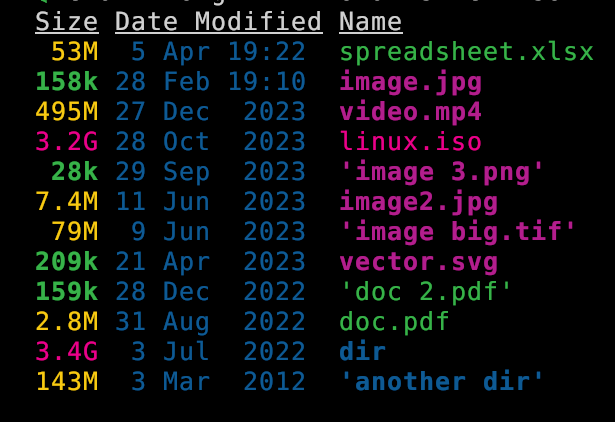
Of course it take a little while to load large directories so you will not want to use by default.

Looks like it was first implemented Oct 2023 with some fixes since then. (Changelog). PR #533 - feat: added recursive directory parser with `--total-size` flag by Xemptuous

1

I just noticed that eza can now display total disk space used by directories!

I think this is pretty cool. I wanted it for a long time.

There are other ways to get the information of course. But having it integrated with all the other options for listing directories is fab. eza has features like --git-awareness, --tree display, clickable --hyperlink, filetype --icons and other display, permissions, dates, ownerships, and other stuff. being able to mash everything together in any arbitrary way which is useful is handy. And of course you can --sort=size

docs:

  --total-size               show the size of a directory as the size of all
                             files and directories inside (unix only)

It also (optionally) color codes the information. Values measures in kb, mb, and gb are clear. Here is a screenshot to show that:

eza --long -h --total-size --sort=oldest --no-permissions --no-user

Of course it take a little while to load large directories so you will not want to use by default.

Looks like it was first implemented Oct 2023 with some fixes since then. (Changelog). PR #533 - feat: added recursive directory parser with `--total-size` flag by Xemptuous

22
submitted 2 years ago* (last edited 2 years ago) by linuxPIPEpower@discuss.tchncs.de to c/linux@lemmy.ml

Question: Is there any auto-correct that works globally in all (or at least, many) applications? Particularly non-terminal. So for example firefox (like this text box I'm typing into), chat, text editors, word processors etc?

Example: I often type "teh" when I meant "the". I would like to have that change automagically.

I'm sure somewhere in my life (not in linux


maybe on mac?) I had the ability to right click on a red-underlined misspelled word in any application and select "always change this fix this to.." and then it would.

Autokey is the only close suggestion I can find. But I guess you have to tell it about every single replacement through the configuration? Are there any pre-made configurations of common misspellings?

How is the performance if you end up with dozens, hundreds, of phrases for it to look out for?

Not looking for: a code linter, command line corrections or grammerly which are the suggestions I have found when searching.

27

I have a multiple user linux system. Well actually a couple of them. They are running different distros which are arch-based, debian-based and fedora-based.

I want to globally use non-executable components not available via my system's package manager. Such as themes, icons, cursors, wallpapers and sounds.

Some of them are my own original work that I manage in git repos. Others are downloaded as packages/collections. If there is a git repo available I prefer to clone because it can theoretically be updated by pulling. And sometimes I make my own forks or branches of other people's work. So it's really a mix.

I want to keep these in a totally separate area where no package manager will go. So that it is portable and can be backed up / copied between systems without confusion. Which is why I don't want to use /usr/local.

I also want to be able to add/edit in this area without su to root. So that I can easily modify or add items which then can be accessed by all users. Also a reason to avoid /usr/local

I tried making a directory like /home/shared/themes then symlinking ~/.themes in different users to that. It sometimes worked OK but I ran into permissions issues. Git really didn't seem to like sharing repos between users. I can live with only using a single user to edit the repos but it didn't like having permissions recursively changed to even allow access.

Is there a way to tell linux to look in a custom location for these resources for every user on the system? I also still want it to look in the normal places so I can use the package managers when possible.

fonts - once solved

On one install, I found a way to add a system-wide custom font directory though I am not able to recall how that was done. I believe it had to do with xorg or x11 config files. I can't seem to find in my shell histories how it was done but I will look some more. I do recall the method was highly specific to fonts and didn't appear to be transferable to other resources.

view more: next ›

linuxPIPEpower

joined 2 years ago