181
submitted 1 year ago* (last edited 1 year ago) by ericbandrews@lemmy.ml to c/mlemapp@lemmy.ml

After a year in development and six months in beta, we are thrilled to announce that Mlem for Lemmy 2.0 is available on the App Store!

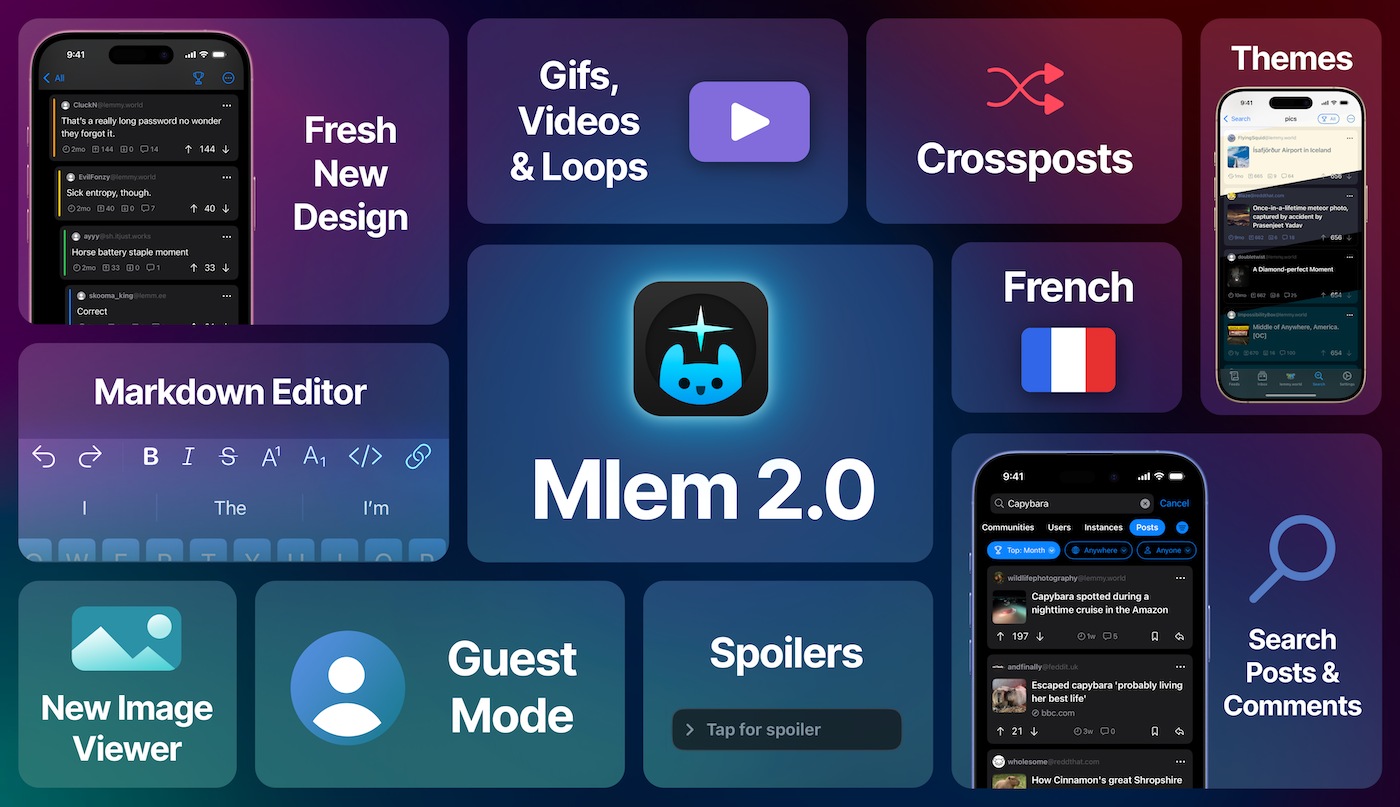
We've rewritten the app from the ground up--it's still the same Mlem our users know and love, but with significant performance improvements, a set of new features that were infeasible in our v1 app, and a fresh new design that feels right at home with the latest versions of iOS. There are more changes than we could list here, so the best way to see what's new is to just download the app, but some of the highlights include:

Media Enhancements

2.0 ships with a brand new image viewer and full support for gifs, videos, and animated webps. We've even added loops.video embedding--link posts to loops.video will display the linked video directly in Mlem.

Color Themes

In addition to the standard light and dark, Mlem 2.0 offers OLED, Solarized, and Dracula color themes, with more on the way. If you'd like us to support your favorite theme, let us know!

Markdown Handling

Powered by our custom cmark fork, Mlem 2.0 supports the full range of Lemmydown syntax.

Enhanced Post Composer

You can now create crossposts directly in the post editor (+ -> Crosspost), and can even post to multiple communities from multiple accounts at once. The keyboard now also sports a comprehensive set of Markdown editing tools.

French Localization

Mlem is now available in French, thanks to pylapp.

And More...

  • Guest mode: you can now browse instances without an account
  • Added a new Tiled post layout
  • Keep place on switch: you can now switch accounts without reloading the app. This behavior can be toggled in Settings -> Accounts or accessed by long pressing an account in the account switcher.
  • You can now search for posts and comments

Compatibility Notice: Mlem 2.0 supports iOS 17 and later. If you are on an older iOS, you won't be able to download this update but will be able to continue using the previous version of Mlem.

Thank you to all of our beta testers, whose feedback and support has been invaluable.

Cheers,

The Mlem Group

Mlem is a free and open source project. 100% of our funding, which pays for things like server time, comes from our generous donors; we do not, and will never, run ads or sell data. If you'd like to help support Mlem, you can donate here.
top 50 comments
sorted by: hot top controversial new old
[-] Thekingoflorda@lemmy.world 21 points 1 year ago

Nice! Thank you (:

[-] fan0m@lemmy.world 11 points 1 year ago

Very happy about the markdown editor!

[-] Fecundpossum@lemmy.world 10 points 1 year ago* (last edited 1 year ago)

Just decided based on this post to check it out as I used to use Mlem back when I first joined, then used voyager for the last year or so. It’s beautiful and smooth and I think I’m keeping it.

[-] ModernRisk@lemmy.dbzer0.com 10 points 1 year ago

I LOVE the new design and for me it’ll replace Voyager (for now).

[-] capybeby@sh.itjust.works 4 points 1 year ago

Is that a threat?

[-] leaf@lemmy.blahaj.zone 2 points 1 year ago

for now

It's an arm's race to get involved in your love triangle.

[-] BeigeAgenda@lemmy.ca 8 points 1 year ago

I searched for it on f-droid, too bad open source iPhone apps don't show up there 😁

[-] ericbandrews@lemmy.ml 4 points 1 year ago

Haha not yet, though there are some promising transpiler projects to bridge SwiftUI over to Android—nothing’s mature enough yet to make supporting both platforms viable, but it’s only a matter of time.

[-] QuarterSwede@lemmy.world 7 points 1 year ago

Been using 2 since the beta and wanted to say great job to the devs. It’s very good and better than Voyager. Looks native and the markdown keyboard is super good.

[-] Hamartiogonic@sopuli.xyz 6 points 1 year ago

The Loops integration is fantastic. Just love it!

[-] leaf@lemmy.blahaj.zone 3 points 1 year ago

It's so easy to see Loops content now!

[-] OccasionallyFeralya@lemmy.ml 6 points 1 year ago

Coincidentally yall updated the app right as I installed it. Gorgeous design, but the posts are so similar to comments I find it confusing sometimes. Would it be possible to have just the comments appear is bubbles while posts remain a rectangle? Or something visually distinct.

[-] sjmarf@lemmy.ml 7 points 1 year ago

Thanks for the feedback. I've opened an issue here to keep track of this :)

[-] leaf@lemmy.blahaj.zone 6 points 1 year ago

Amazing work 🤩

This update is going to cause another surge in user registrations!

[-] awesomesauce309@midwest.social 5 points 1 year ago

Love the new features. You could post the markdown editor as its own keyboard extension. Undo and redo right there are invaluable, maybe with cut and paste.

The only features I can think of is a toggle so when you scroll the feed, if you long press media instead of save/share have it show the media in something like Quick Look. And video scrubbing

I feel like sometimes people shy away from open source because it can be unpolished, but not Mlem. This is polished to a shine, and adding loops integration is a cherry on top.

[-] ericbandrews@lemmy.ml 3 points 1 year ago

Thanks for your kind words!

Scrubbing is actually next up on my todo list, so you shouldn’t have to wait too long for that one.

[-] esteemedtogami@lemmy.one 5 points 1 year ago

Damn, my iPad doesn't go beyond iPadOS 16. Guess I'm going out to get a new iPad. Great work!

[-] mbtrhcs@feddit.org 4 points 1 year ago

Really like the new design and I think Mlem definitely carries the same "native" feel that Apollo used to. I just wish it had customizable swipes so I could make the switch from Voyager, but it looks like that's a low priority feature for now

[-] sjmarf@lemmy.ml 4 points 1 year ago

Thanks for the feedback! This has a been a highly requested feature for a while. It would have been tricky to implement in Mlem 1.0 due to the app’s original design. However, in Mlem 2.0, we’ve built the swipe actions system with future customization in mind. We're planning to add customizable swipe actions sometime soon - the GitHub issue is here, if you want to keep an eye on our progress :)

[-] mbtrhcs@feddit.org 2 points 1 year ago

That's great to hear! I saw the issue a few days ago but since it didn't have any comments or milestones (at the time) I assumed it was just lost in the backlog. Thanks for the update! :)

load more comments (3 replies)
[-] windowsphoneguy@feddit.org 4 points 1 year ago

Looks great!

[-] sqw@lemmy.sdf.org 3 points 1 year ago

it just keeps getting better! thank you mlem devs!

[-] Isa@feddit.org 3 points 1 year ago* (last edited 1 year ago)

It's sooo wonderful, thanks! 🫶

[-] capybeby@sh.itjust.works 3 points 1 year ago* (last edited 1 year ago)

I adore the card mode!!

[-] Shezzagrad@lemmy.ml 3 points 1 year ago
[-] ericbandrews@lemmy.ml 8 points 1 year ago* (last edited 1 year ago)

Mlem is written in SwiftUI, which unfortunately is not compatible with Android. There are some promising projects to port Swift apps to Android, but nothing mature enough that we could feasibly support both platforms, though we’d like to if/when the cross platform Swift ecosystem matures enough for that to be realistic.

[-] Shezzagrad@lemmy.ml 3 points 1 year ago

Totally understand and thank you for your excellent response

[-] leaf@lemmy.blahaj.zone 2 points 1 year ago* (last edited 1 year ago)

Nice, it could work out like Orion with the chromium/firefox extensions working on ios.

[-] Jhogenbaum@leminal.space 3 points 1 year ago

Not in Google play store. Seems to only be ios.

[-] sjmarf@lemmy.ml 7 points 1 year ago

That is correct - Mlem is available on iOS only.

[-] xnx@slrpnk.net 3 points 1 year ago

Looks great! Was the hide read posts button removed? Cant find it

[-] sjmarf@lemmy.ml 3 points 1 year ago

Nope, it should still be there:

[-] xnx@slrpnk.net 2 points 1 year ago

Oh i thought there was an option to also make it a button in the home screen

load more comments (1 replies)
[-] GammaGames@beehaw.org 2 points 1 year ago

How do I enable gestures? I appreciate that swipe left to go back a page is here, but I can’t actually figure out how to interact with anything without opening a separate menu

[-] sjmarf@lemmy.ml 2 points 1 year ago

You can enable gestures under Settings -> General -> Swipe Actions. You cannot have swipe actions enabled at the same time as the "Swipe Anywhere to Navigate" setting.

[-] GammaGames@beehaw.org 2 points 1 year ago

Ah gotcha, thanks!

[-] Wisens@discuss.tchncs.de 2 points 1 year ago

I like the ability to have "Blur NSFW" content from the quick menu on the top right when I'm in public or at work. Why was that moved/removed?

[-] sjmarf@lemmy.ml 4 points 1 year ago

In 2.0 we rewrote the whole app from the ground up, and just forgot to re-implement that feature haha. We'll add it back in for next week's beta 👍

load more comments (2 replies)
[-] chase_what_matters@lemmy.world 2 points 1 year ago

I’m wondering how difficult it would be to allow us to change text size. Compared to the rest of the UI, comments feel large and bold.

[-] sjmarf@lemmy.ml 2 points 1 year ago

You can change the text size for the app as a whole by going to System Settings -> Accessibility -> Per-App Settings (at the very bottom) -> Mlem -> Larger Text. We don't currently offer a way to change this for only part of the app, such as for comments only.

load more comments (1 replies)
[-] Bogus5553@lemm.ee 2 points 1 year ago

It’s absolutely marvelous, but the little info box about which image type is on display is in many cases covering text.

[-] sjmarf@lemmy.ml 3 points 1 year ago

The image type label is only shown when Developer Mode in switched on under Settings -> Advanced. If you turn off that setting, you won't see the label. We've got an issue open to move the image type label out of the way of the image when developer mode is on (link).

[-] Bogus5553@lemm.ee 4 points 1 year ago

Thanks a lot, and thanks for the great app! It’s a pleasure to run it (:

[-] sjmarf@lemmy.ml 3 points 1 year ago

I'm glad you're enjoying it :)

load more comments
view more: next ›
this post was submitted on 08 Mar 2025
181 points (98.9% liked)

Mlem for Lemmy

6803 readers
1 users here now

Official community for Mlem, a free and open-source iOS Lemmy client.

Rules

  1. Keep it civil.
  2. This is a forum for discussion about Mlem. We welcome a degree of general chatter, but anything not related to Mlem may be removed at moderator discretion. This is not a forum for iPhone/Android debate. Posts and comments saying nothing but "iOS bad/I use Android" will be removed as off-topic.
  3. We welcome constructive criticism, but ask that it be both precise and polite.

FAQ

Download Mlem for iOS

GitHub

Website

Donate to Mlem

founded 3 years ago
MODERATORS