[-] lost_faith@lemmy.ca 2 points 56 minutes ago

We know they switch between right/left depending on leader and what they think will win them the election. The cons go crazy right, the NDP needs help, hopefully Avi will lift them to the spotlight though sadly the only time the NDP really excels is when the population gets sick of the liberal bullshit (for a sitting then forget why the elected the NDP and go right back)

[-] lost_faith@lemmy.ca 4 points 1 day ago

My Pi3b is a great little emulator, retropi worked great last time I plugged it in

[-] lost_faith@lemmy.ca 3 points 5 days ago

It was when I went to school, can't believe it has gotten better since then

[-] lost_faith@lemmy.ca 1 points 6 days ago

Windows 10 used to do similar to me, I'd wait until I had no choice to install updates. While waiting to ensure the updates wouldn't have unfortunate side effects, my PC would noticeably slow down but as soon as the update was applied, boom, back to normal speed. I did reboot before every VR stream but only applying the update would return the pc to normal speed.

4
submitted 2 months ago by lost_faith@lemmy.ca to c/linux_gaming@lemmy.ml

This is the stand alone version of the game from the Elder Scrolls Online website, not steam. Using Kubuntu 24.04

So this issue came up earlier and I decided to hide my head in the sand and just not update Lutris(flatpak) from 5.18, something (gf didn't see exactly what) inside lutris updated on tuesday (one of the bottom left options between flatpak and windows) and 5.18 stopped working and started acting like paragraph below, there is no more sand since the forced update.

As of Lutris 5.2 my gf cannot enter login info on the screen, moving the mouse over any other buttons on the screen work (they light up and do what they should when clicked like quit), I can find no work around online. I reinstalled ESO last night and the new install went smoothly but does the same thing.

So, I tried to install it in bottles but got a "host_ieversion error" which turns out to mean the version of IE is incompatible. How would I go about installing a version of IE8 (the one they supposedly want) or above in bottles to get the install working there? Is IE8 enough or should a version of edge be installed instead? Would I just use the "run application" (top option in bottles config) and run the ie/edge installer before running the eso installer? Would Heroic launcher be a better choice for this game (only looked at Lutris and Bottles so far)? Would the .deb versions of these launchers be better than flatpak?

Also tried to install in steam as a non-steam game but it wouldn't even launch the installer, but thinking about it now (it was late) I think I forgot to turn compatibility (in steam) on so that is a fail on my side, gf doesn't use steam (just made an account last night) and never has so getting it working this way is the final option.
27
submitted 4 months ago by lost_faith@lemmy.ca to c/linux@lemmy.ml

I have a friend coming for a visit in a few months, early spring, who is legally blind, I believe less than 2% vision in one eye and none in the other. I want to hand him a laptop with kubuntu on it to use while here for web browsing (Firefox) and streaming (OBS/Stream yard). He does not read braille.

Are there any users with this disability here, or anyone have experience setting up KDE for visually impaired people, what apps do you use?

I've briefly looked at Orca but it says it is a Gnome app (will need to look deeper/test it), Emacspeak looks like something I will try to setup for him, seems to not be a dumb reader. I want him to have such a good experience he would be willing to change his own pc over (prolly won't happen but I'd still like his experience to be as easy as possible for him)

16
submitted 4 months ago by lost_faith@lemmy.ca to c/linux_gaming@lemmy.ml

Running Kubuntu atm but looking to see if I can get more out of my hardware. I booted up Cachy last night from ISO and it took barely any of my ram, 3gb I think, for the test I was going to install Steam and link to my existing game library mounting my kubuntu drive. My VR experience is quite acceptable at the moment, but it could be better. I get occasional stutters and sometimes I am put into the steamVR environment for a second if I turn too fast, I am hoping a more up to date kernel could help. Using the steam system monitor shows that when this happens my CPU/GPU/RAM are never close to being at 100% often at or less than 75% usage each, though the FPS is often around 40 - 60 (og vive headset, on windows rarely went above 50fps often down to 30). Hardware is Ryzen9 9950X and Radeon RX 9070XT OC. So the questions are:

  1. Will everything just "work" as stated? Install steam, link to steam library for games (I expect these to just work, downloading for a one off test will take a long time on a problem game of 15+gb) and steamvr (this is my kinda concern, though it should be small enough to install in ram if necessary)?
  2. I have 64gb ram, will this run similarly to being properly installed on an m.2 drive?
  3. Is there anything I should look out for when doing this?

Any tips, suggestions, or links would be appreciated. I am not at my pc but should be able to answer most questions.

Asking here as this IS gaming related, but if another place would be better I will move the post there.

17
submitted 5 months ago by lost_faith@lemmy.ca to c/linux_gaming@lemmy.ml

Ok, so I have Kubuntu installed running wayland and setup steamvr. The first few times it gave me the screen sharing portal, but through NOT reading carefully I accidentally setup all screens as the same one instead of the 2 different displays and 1 mirror display. OBS has this wonderful little button to trigger this to open to change which screen is shared, does anyone know how to do this for steamvr? (if you need info plz supply the command to retrieve it) I will say that wayland is working great for me so far except for my error, out of the 6 vr games I have tested (they ran badly on my previous system) only Into the Radius 2 has a slight flashing/flickering issue the other games that were almost or completely unplayable under my last system (RTX 4070ti super) are smooth as butter now.

I have temporarily gone back to X11 due to not being able to access my desktop through WLX-Overlay-s. Any help would be appreciated.

66
submitted 7 months ago* (last edited 7 months ago) by lost_faith@lemmy.ca to c/linux@lemmy.ml

So, I changed my daily driver to linux several months ago and my gf a few weeks ago. I noticed 2 strange but good things after the change. For my system I have a onboard sound card (stereo) and am using 3 of the 5 speakers for my decade or so old Creative labs 5.1 speakers. Under win 10 most of my sound came from the left and centre speakers with base cannon doing its thing, under linux using the generic drivers included during install all 3 desktop speakers put out the appropriate sound. YAY!

My gf is using my old hand me down prebuilt. Under win 10 the fans on that thing would be kicking on and off constantly, I could hear the fans over the running water doing dishes. Now? 99% of the time is straight silence unless she is playing ESO.

Only issue left on her machine is having it be able to play ESO and be able to watch a yt vid at the same time. Right now it is ESO and nothing else, when she tries the whole system lags until she can move the mouse painfully slowly to the browsers X. forget which intel cpu is in there(it's about 8-10 yrs old iirc), GTX 1060 ~~6~~ 3gb, and 16gb ram, Kubuntu 24.04, KDE. Are we asking too much of the system, did I misconfigure something? She was able to do this on windows

11
submitted 7 months ago* (last edited 7 months ago) by lost_faith@lemmy.ca to c/linux_gaming@lemmy.ml

I've been hearing some good things about WinBoat, so I am wondering if anyone has tried to use it with game mod loaders. Like the windows version of Satisfactory Mod Manager (I know there is a linux one that works perfectly and exactly like the windows version but as this is a very popular game maybe someone did it this route) or, the one I am really interested in right now, Raft Mod Loader. Raft Mod Loader page suggests 1. Bottles and less recommended 2. straight wine. I would like to use a single solution for most of my windows carry overs, ie; steam is one stop for ~90% of my games flat and VR, lutris is one stop for 2 non steam games atm, but I am uncovering more as I go.

I also have 2 windows only apps for VR - FPSVR and Desktop+(this is free), obviously they will not want to port their apps to linux for such a small user base. Has anyone tried these in WinBoat?

EDIT: So, yeah. For my needs this is a 20lb sledge hammer putting in a finishing nail

69
submitted 7 months ago* (last edited 7 months ago) by lost_faith@lemmy.ca to c/linux@lemmy.ml

Tonight I am installing Kubuntu on the gfs machine. Once she is comfortable with that, and the support ends for our version prolly going with Debian. Going to remove her windows drive (256 or 512GB) as there is only 1 m.2 port on the board, and replace it with a 1tb.

Her needs are simple, make Logitec G13 work (works and tested on my machine for months), Make ESO and addons work (Lutris has its own installer for ESO YAY! Minion has a linux version.), and minecraft java (found in app manager).

Now, she has some knock off razor mouse with buttons under the thumb, maybe the razorx software or whatever it's called will work on her mouse?, this may be a slight pain point. I am hoping this will work out and she will be happy with her (new) pc, we are preserving her windows as a fall back if she hates it. I have a short video lined up to teach her the linux file system. She won't be doing anything command line, for now, except to start the G13. Gonna leave her with the dolphin file manager as it is difficult to get elevated privileges compared to nautalis(sp?) where it is a simple checkbox click. Anything else to suggest here?

I can mostly teach her what she needs to know as we go, she is a smart cookie and has picked up everything I taught her for windows and networking so far so should not be an issue for her, but if you guys have any suggestions on tutorial vids for non power users or other things I can do to make this even more seamless it would be appreciated.

Edit: Thank you all for your input, very much appreciated. I will keep monitoring for new posts

[-] lost_faith@lemmy.ca 51 points 10 months ago

They do not miss us, they miss our MONEY. They have 50 of us in custody and have murdered 1 of us. No, FUCK YOU.

[-] lost_faith@lemmy.ca 96 points 10 months ago

Hint: it's not the tariffs, we are used to that from the [redacted] from our southern border, it's the threats against our sovereignty

4
submitted 1 year ago* (last edited 1 year ago) by lost_faith@lemmy.ca to c/linux@lemmy.world

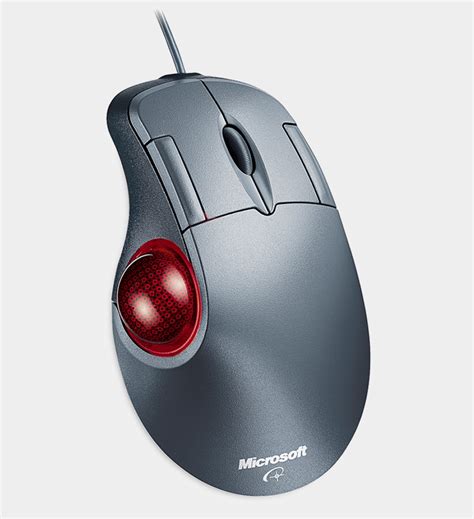
I used to use linux decades ago, then stopped for multiple reasons. Now, with win 10 eol fast approaching, I have installed Kubuntu 24.04.2 mainly for VR gaming but other gaming and normal pc use as well. I have 2 devices I would like to replace for ones with full linux support(~~drivers~~ software), unless there are ~~drivers~~ software that are easy to install not requiring compilation from source. The devices are a Microsoft Intellipoint Trackball, basically a thumb driven trackball with at least as many buttons (more is better) as the image shows.

The second device is a Logitec G13

I use this for most of my flat games, and to control my video player. Suggestions for similar hardware or easy fully functional drivers would be appreciated. ie; the g13 has game profiles, stopwatch, clock, system monitor, and a few things I don't use, the trackball has all 7 buttons programmable to anything on the kb and then some.

[-] lost_faith@lemmy.ca 175 points 1 year ago

Gonna have to try this at least once

[-] lost_faith@lemmy.ca 91 points 1 year ago

This movement simply has no real agenda or philosophy - they just want to burn everything down.

That is the agenda

1
submitted 2 years ago by lost_faith@lemmy.ca to c/asklemmy@lemmy.world

As I scroll through Lemmy, I keep seeing the same posts over and over. Exact same title (usually cross posted). Is there a way to group these posts so that we can decide which instance to interact with instead of seeing the same post 6+ times? It starts to feel like the content is just being recycled to the top of the next page.

I use the default browser on PC and Summit on my phone and usually sort by new. This same issue was starting to get to me on reddit til I left

[-] lost_faith@lemmy.ca 55 points 2 years ago

FFS. What a piece of shit company. Guess we know who they side with.

[-] lost_faith@lemmy.ca 59 points 2 years ago

Locks are there to keep honest people out. Any lock can be opened given time

[-] lost_faith@lemmy.ca 96 points 2 years ago
[-] lost_faith@lemmy.ca 57 points 2 years ago

Ahh Apple, the first to introduce what Android users have simply taken for granted

view more: next ›

lost_faith

joined 2 years ago