321

I'm considering the switch to GrapheneOS, so I watched this interview with one of the members of the GrapheneOS team, and honestly, I feel it was a great general introduction to it and touched on common features and misconceptions.

For those who don't know, it's one of the most secure and private mobile operating systems out there. Some things that I took away:

  1. They touched upon MAC randomization. I researched a bit on my own about what the need for it is. Apparently, it's standard practice to randomize MAC addresses when scanning WiFi connections. However, GrapheneOS (and Pixel firmware) are even better at this, as they make sure they don't leak any other identifiers when doing so. They also allow you to get a new random MAC for every connection that you make (not sure whether this is very useful, as this can cause problems). On a related note, even when WiFi/Bluetooth are "off," stock Android can still scan in the background to improve location accuracy (by matching visible networks/devices against Google's database). So basically, even with WiFi/Bluetooth off, Google still knows where you are. In GrapheneOS, this option is off by default.

  2. They have their own reverse proxies that they use to talk to Google on your behalf when needed.

  3. Apparently, in the USA you can be compelled to provide a fingerprint or Face ID. Courts have ruled this doesn't violate the 5th Amendment because it's physical, not testimonial. BUT you cannot be compelled to provide a password/PIN. That's considered testimonial evidence, protected by the 5th Amendment. GrapheneOS has a two-factor system where, after using your fingerprint, you still need to enter a PIN, so it helps with this. They also have a BFU state after reboot, which is the safest and requires you to enter your full passphrase.
top 50 comments
sorted by: hot top controversial new old
[-] AmbitiousProcess@piefed.social 61 points 3 weeks ago

Hey there, GrapheneOS user here!

They also allow you to get a new random MAC for every connection that you make (not sure whether this is very useful, as this can cause problems).

This can not only be turned off entirely in settings, but you can actually modify it on a per-network basis! For example, on my home network, I can tell it to use no randomized MAC at all, or a per-network randomized MAC, meaning it will choose a different MAC address than my normal one whenever I connect to my home network, but it will always be the same MAC on my home network, only changing on other networks.

They have their own reverse proxies that they use to talk to Google on your behalf when needed.

Which you can also disable if you don't want GrapheneOS to proxy any particular type of your data, and you'd rather it just go straight to Google instead for security reasons, even if you give up a little privacy.

Apparently, in the USA you can be compelled to provide a fingerprint or Face ID

BUT you cannot be compelled to provide a password/PIN.

Yep, however an important caveat is that if you're not a US citizen, you can still be compelled to give up your password or PIN, otherwise you'll be denied entry to the country. And, if you're a US citizen, you can have your phone seized and held for some time (i.e. months), even if you're then allowed entry to the country. (this is likely so the government can wait for an exploit to become known, or have more time to run a cracking algorithm that's computationally expensive)

GrapheneOS has a two-factor system where, after using your fingerprint, you still need to enter a PIN

Not enabled by default though! This can also be used within the OS itself. For example, I can set a PIN+Fingerprint access for my lockscreen, or PIN-only access, then still individually lock an app on my phone with a fingerprint without it also having to be enabled for my lockscreen. I'm unsure if that's supported on stock Android.

They also have a BFU state after reboot, which is the safest and requires you to enter your full passphrase

All phones have a BFU (before first unlock) state, and GrapheneOS doesn't require a passphrase unless you've set one, otherwise it's your PIN. Fingerprint unlock is disabled until after BFU though, so it requires essentially using a backup PIN even if you always use your fingerprint, at least for first unlock.

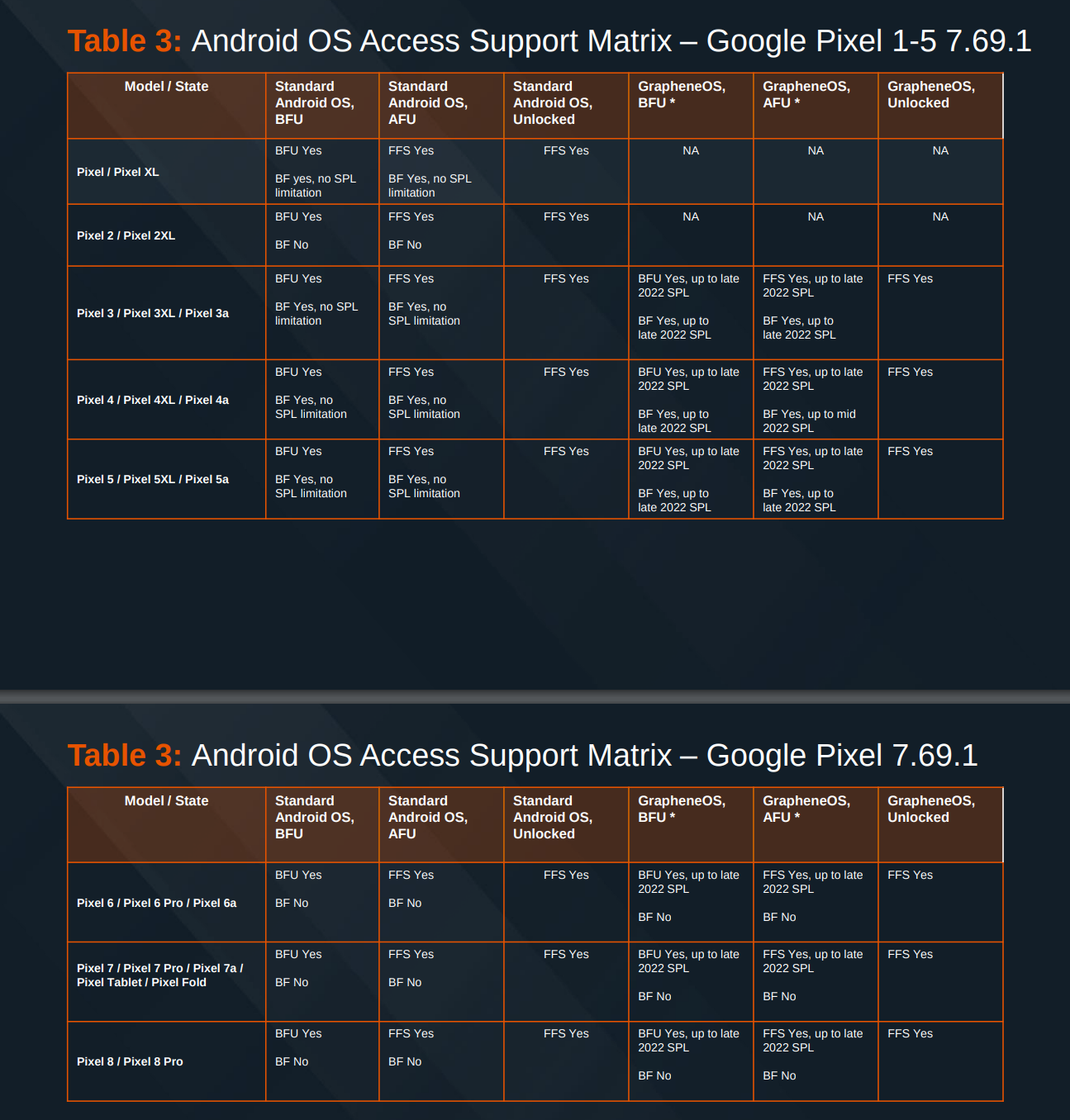
However, GrapheneOS is unique in that companies like Cellebrite, who sell the government hardware and software to crack people's phones and exfiltrate their sensitive data, have stated in leaked slides that they can't unlock GrapheneOS devices BFU, (if they're updated to at least security patches after 2022, which any GrapheneOS user reasonably should be) while they can crack stock Android devices BFU.

table

This is why I always make sure to fully shut down my phone before I go through airport security, for example. It's also possible to simply "Lockdown" the phone to disable biometrics again and require a PIN/Password like during BFU, but in that state the phone is not actually in a BFU state, so it's not fully protected.

even when WiFi/Bluetooth are “off,” stock Android can still scan in the background to improve location accuracy (by matching visible networks/devices against Google’s database). So basically, even with WiFi/Bluetooth off, Google still knows where you are. In GrapheneOS, this option is off by default.

There's a tiny bit more nuance to this. Your cell service will still be active even if you disable WiFi/Bluetooth, and that can still track you, even if it's not through Google's location services, since your carrier still gets pings from your phone.

GrapheneOS's airplane mode disables the cellular radio entirely, whereas some OEMs don't do that on their phones, even when you turn on airplane mode, meaning your cell provider could still triangulate your position regardless of if you have airplane mode on or off.

Also, GrapheneOS additionally supports a proxy service for more accurate GPS positioning, which can reduce the amount of data available to Google, even if you need more accurate positioning data using nearby networks.

[-] Truscape@lemmy.blahaj.zone 18 points 3 weeks ago

Don't forget the Duress password!

load more comments (1 replies)
[-] chasteinsect@programming.dev 11 points 3 weeks ago

Thanks for the in-depth answer, I think I will try installing Graphene today.

This can not only be turned off entirely in settings, but you can actually modify it on a per-network basis!

Oh nice ! Makes it way more useful then as I saw forum threads of people saying there's no point in randomizing on your home network and may cause issues.

GrapheneOS’s airplane mode disables the cellular radio entirely, whereas some OEMs don’t do that on their phones, even when you turn on airplane mode, meaning your cell provider could still triangulate your position regardless of if you have airplane mode on or off.

Did not know that, fascinating! Even Airplane mode is upgraded :D

[-] AmbitiousProcess@piefed.social 5 points 3 weeks ago

I will try installing Graphene today.

Good luck!

First thing I'd recommend you do when you get it set up is literally just go through every single settings menu and see if anything catches your eye. There's a lot of random settings that GrapheneOS adds that can be very useful. Some of these might not be visible at first glance. (for example, when you're installing an app, a popup will appear asking if you want to grant the app network access when you install it, and if you toggle it off, that app can't talk to the internet at all, not for ads, telemetry, or anything at all.)

Just be aware that some features that Google implements on stock Android aren't available, because they're not part of the Android Open Source Project (AOSP)

Things like Google's Find My Device features, some of the extra lock screen customization (e.g. custom clocks other than just simple color changes), automatic music recognition, (e.g. Shazam but built into the OS and running in the background for some reason), etc.

load more comments (2 replies)
[-] sic_semper_tyrannis@lemmy.today 11 points 3 weeks ago

Thanks for the Mac address tip. My home WiFi UI gets super slow after I have a million different devices connected because I have multiple GrapheneOS devices. Now I won't have to constantly delete logged devices

[-] FauxLiving@lemmy.world 10 points 3 weeks ago

All phones have a BFU (before first unlock) state, and GrapheneOS doesn’t require a passphrase unless you’ve set one, otherwise it’s your PIN. Fingerprint unlock is disabled until after BFU though, so it requires essentially using a backup PIN even if you always use your fingerprint, at least for first unlock.

To add to the security of the PIN and to prevent reading screen smudges you can enable an option so that the digits on the PIN pad are randomized each time it loads.

Graphene also supports fully isolated user accounts. Applications running in one profile can not even discover the existence of the other profiles*. There is a way to forward notifications from user containers but is disabled by default. Each account, when inactive, is encrypted independently of the system drives and the key is generated at user login with the entry of a password and overwritten in memory upon logout.

*If you enable the notification forwarding, a hostile application running on the primary account could deduce that there is at least one other user profile on the phone by analyzing the notifications.

[-] AmbitiousProcess@piefed.social 8 points 3 weeks ago

To add to the security of the PIN and to prevent reading screen smudges you can enable an option so that the digits on the PIN pad are randomized each time it loads.

I can't believe I forgot to mention that! I use it myself, and while it can take a bit to get used to typing by actual numbers and not muscle memory, it's great for minimizing the risk of shoulder surfing.

Graphene also supports fully isolated user accounts.

And it supports stock Android's Private Space feature, too!

[-] vatlark@lemmy.world 7 points 3 weeks ago

Wow they really put a lot of detailed work into it

[-] FauxLiving@lemmy.world 6 points 3 weeks ago

That's only a tiny, tiny piece of it. If you want to know more: https://grapheneos.org/features

[-] trevor@lemmy.blahaj.zone 52 points 3 weeks ago

On #3: every modern phone running encryption has a BFU (before-first-unlock) state where the data on the device is more secure than after its first unlock because you haven't entered your password/PIN to decrypt the data. GrapheneOS also has this, but it is not unique to GOS.

[-] chasteinsect@programming.dev 6 points 3 weeks ago* (last edited 3 weeks ago)

Yeah I apologize, I incorrectly assumed that GrapheneOS's BFU state is more secure and requires you to enter your passphrase by default and not PIN and that this is not available on stock android which some people pointed out it is.

On a related note though, Graphene does have an interesting feature where if phone hasn't been unlocked for some time it will force reboot to get into that BFU state. Metroplex sets it to 8 hours.

I think they also have some aggressive USB port control, but I haven't looked into it. Where you can only charge phone in BFU state or something like that. Haven't had time to read into it : https://grapheneos.org/features#usb-c-port-and-pogo-pins-control

load more comments (1 replies)
[-] emotional_soup_88@programming.dev 5 points 3 weeks ago* (last edited 3 weeks ago)

Would be great if it was possible to protectively encrypt the phone from an on-state, as it were in BFU. Through a shell command or an app or something...

load more comments (10 replies)
[-] myfunnyaccountname@lemmy.zip 21 points 3 weeks ago

That’s cool and all. But I just want a working Linux phone to use as a daily driver. That doesn’t require constant fiddling and is made with modern, powerful, hardware.

[-] Taalen@lemmy.world 3 points 3 weeks ago

Keep an eye out for what people say about Jolla's next phone, when it's out sometime next year.

load more comments (1 replies)
[-] mazzilius_marsti@lemmy.world 16 points 3 weeks ago* (last edited 3 weeks ago)

2 months GOS user here on Pixel 9. So far so good. You do have a lot more controls over the traditional Android phones. In fact, you have too much that for average user, i think it can be a bit overwhelmed.

PROFILES

For eg, you can easily install Google apps and use them like a normal phone. Problem is on Graphene, you have many ways to set this up. You can:

a) install in your main profile and be done

b) install Gapps in main the private space within main profile

c) some crazy stuff like install Gapps in the private space of a secondary profile, which you lock using a completely different password.

I spent too much time in this loop lol. Finally i settle on: all daily apps in main profile and sensitive apps live in a separate profile (banks, important docs).

SECURITY

  1. Next the security features in GOS are amazing. You can control every single permissions that an app can do. I mean every thing including the system Phone app. I can go 100% paranoid and prevent the Phone app from Phone logs, microphone and Phone. Essentially making the Phone app useless.... Very very nice but you need to experiment with your apps and see which permisions you can deny and which you cant. On normal Android? You can deny some apps but the system ones, you cant.

  2. I especially like the USB c feature. I leave mine on Charge only. So the port only functions to charge my phone. This cuts off every other connections: plug into PC, plug into car for Android Auto....etc. I like it that way. .

Btw, Android auto works great too if you need it. .

OS is so minimal that you will need to install essential apps on your own. For eg, i use Florisboard for keyboard, MiX for file manager.

  1. I really like the screenlock options on GOS. You can set:

a) your usual password, pin, fingerprint

AND

b) a secondary pin that can be scrambled at random. So you unlock with your fingerprint then you need to enter that 2nd pin or password to enter the phone. EVERY single time. And it is scrambled too so you dont have to worry about people tracing your fingers.

AND

c) the Duress pin. This is like the nuke PIN. You set this up and hypothetically you are in a dangerous situations (thieves want you to unlock, local police abuse your phones....etc), you can enter this instead of your normal screen lock pin/password and every data is nuked. I havent tried it yet because i spent too much time set my phone rhe way I like it lol. If somebody tries it out, pls let me know.

INSTALLATIONS

Stupidly easy. On the OG Pixel, if you want to install LineageOS, you have to be very careful. Beside downloading the ROM, you need to flash a custom recovery like TWRP. Then becaude it is a Pixel, you nees to be careful which slot to flash the ROM. Flashing to the wrong one will brick the phone.

On Graphene? It is literally plug your phone in and open the browser where the install notes are. The ONLy technical thing I need to do during the process waa enable bootloader unlock. Everything else was like "GOS finishes this, GOS finishes that, can you press this button, GOS is rebooting..". .Very very simple.

**SOME HELPFUL POINTS (i hope) **

  1. dont treat this as a Degoogle phone. .You can but the strong point of GOS is security.

  2. some features are not available compare to like.Samsung's ONE UI . For eg, only allows an app to connect to 5G and not wifi.

  3. dont create a super complicate setup. The backup process will a pain.

load more comments (1 replies)
[-] emotional_soup_88@programming.dev 12 points 3 weeks ago

Great summary! Thanks for this! If I were to make the switch to GOS - which I am considering, Samsung user ATM, I'd never travel abroad - especially to and from the US - with my daily GOS driver. I'd travel with a backup phone that contains nothing. A new SIM card and some random chat app for communication with my loved ones. This is for plausible deniability (if I indeed were involved in anti government activism etc) and to avoid all the fuss. Not unlocking my phone gets me into trouble. Wiping my phone gets me into trouble. In that case, I just leave my daily driver at home.

[-] LytiaNP@lemmy.today 12 points 3 weeks ago
[-] DieserTypMatthias@lemmy.ml 9 points 3 weeks ago

They also have a duress PIN.

[-] Sasquatch@lemmy.ml 3 points 3 weeks ago

I believe if you are compelled by police to unlock your device, and you wipe it instead, you may be charged with destruction of evidence, or at least obstruction of justice

[-] muusemuuse@sh.itjust.works 8 points 3 weeks ago

Even the iPhone can handle the bully tactics with cops. Simply attempt to shut down the phone. You don’t have to follow through, pulling up the shutdown slider is enough. It will require a password to unlock after that.

load more comments (1 replies)
[-] rosco385@lemmy.wtf 8 points 3 weeks ago

The only thing I missed when switching to GrapheneOS from Android was Google Pay, and that wasn't that big of a loss.

[-] chasteinsect@programming.dev 9 points 3 weeks ago

Yeah, as they said most banking apps now work, however, Google Pay doesn't.

There are alternatives to it like curve pay but I haven't done the research whether they're trustworthy enough. EU company I think.

load more comments (1 replies)
[-] Buckshot@programming.dev 8 points 3 weeks ago

I just got a phone case that holds my debit card in the back and turned off NFC.

[-] PearOfJudes@lemmy.ml 5 points 3 weeks ago

You have to install GrapheneOS' Google Play (sandboxed) and services for banking and government apps. And you can install Google Play with stock Graphene, it is very easy.

[-] pmk@piefed.ca 8 points 3 weeks ago

In my country everything is built around this 2FA app that requires Google Play Services. But a phone with GrapheneOS and sandboxed google play should be better in total than just running stock android I guess? I wish I didn't need google play services, but currently I do.

[-] chasteinsect@programming.dev 7 points 3 weeks ago

The threat level for google play services is different in graphene as it runs in what they call an "appbox," which basically means Google Play is just another app that's sandboxed like everything else.

load more comments (2 replies)
load more comments (1 replies)
[-] deathmetal27@lemmy.world 8 points 3 weeks ago

Is switching to GrapheneOS reversible?

I was wondering whether it affects warranty or hinders seeking service if there's any problem in the phone.

[-] hornedfiend@sopuli.xyz 11 points 3 weeks ago* (last edited 3 weeks ago)

it is 100% reversibile on pixels made so far and since it's only available for pixels...

Edit: Afaik there are no warranty issues if you flash stock rom before, which might make it harder if your hardware fails.

[-] Eat_Your_Paisley@lemmy.world 7 points 3 weeks ago

I've been using Grapheme on a Pixel 8 Pro for about 6 months it's been an adventure. There are so many options to lock stuff down but when you try full lock down some apps don't work and the error messages they throw don't say much so you in harden one thing at a time to make them work. This is not a phone you can just throw your SIM in and expect it to be just like your old phone.

I do feel pretty confident with this phone on a Cabe SIM but you do need to commit.

load more comments (2 replies)
[-] TankovayaDiviziya@lemmy.world 5 points 3 weeks ago

I told you I will switch to Graphene OS, you don't have to sell it to me.

[-] soldan@lemmy.ml 5 points 3 weeks ago* (last edited 3 weeks ago)

grapheneOS is a great system, it's a shame about the absurd accusations made against eOS and iodé. On the other hand, the biggest problem with grapheneOS is its exclusivity: it only works on certain Pixel models, which are very difficult to find and expensive. Here in South America, it's very difficult to find a Pixel, not to mention that they're prohibitively expensive. But I suppose if you need that level of security, you'll pay whatever it takes.

[-] PM_ME_YOUR_BOOBIES@lemmy.world 4 points 3 weeks ago

For point 1, you can choose the MAC privacy settings on a per-connection basis. For example, my MAC is randomized periodically on all connections except my home network, where I use my device MAC.

load more comments (1 replies)
load more comments
view more: next ›
this post was submitted on 20 Dec 2025
321 points (98.2% liked)

Privacy

44365 readers
250 users here now

A place to discuss privacy and freedom in the digital world.

Privacy has become a very important issue in modern society, with companies and governments constantly abusing their power, more and more people are waking up to the importance of digital privacy.

In this community everyone is welcome to post links and discuss topics related to privacy.

Some Rules

Related communities

much thanks to @gary_host_laptop for the logo design :)

founded 6 years ago
MODERATORS